Key takeaways
- MFA fatigue works because push prompts carry no context: the target cannot distinguish a legitimate login from an attacker's attempt.
- Number matching requires the user to type a code shown on the sign-in screen, which blocks blind approval and defeats the pretext call.
- Microsoft Entra ID and Okta both support number matching and push-rate throttling, but neither is enabled by default on all tenants.
- A vishing call timed to arrive while push prompts are still flowing gives the attacker an authoritative explanation for the noise.
- Registering a second device immediately after session capture gives the attacker access that survives a password reset.
The attack in three phases
MFA fatigue is not a cryptographic weakness. It is a failure of the human review step that sits on top of a working second factor. The push prompt asks only approve or deny, and an attacker who already holds a valid password needs only to generate enough prompts that the target approves one. When a pretext call arrives mid-flood, it explains the noise and tells the target what to do.
This is a social engineering technique that spans two phases of the Unified Kill Chain. The credential is obtained before the call, in the In phase. The call and the approval happen in the Through phase. The figure below maps the full chain from open-source reconnaissance to persistent session access.
In
Reconnaissance
Job role, manager name and email confirmed from open sources
Credential access
Password confirmed via spray, breach data or credential stuffing
Through
Push flood
20 login attempts trigger 20 push notifications in 60 seconds
Pretext call
Attacker calls as IT support while prompts are still flowing
Approval
Target approves one push, satisfying the second factor
Out
Session capture
Attacker holds an authenticated session in the tenant
Factor registration
Attacker enrolls their own device to survive a password reset
Before the call: obtaining the first credential
The push flood requires a confirmed email address and a valid password. OSINT delivers the address: LinkedIn, company directories and email-format inference reliably produce working addresses for most organisations. The password comes from spray, breach data or credential stuffing. MITRE ATT&CK T1598 covers targeted phishing for credentials as a parallel path. Spray works on the assumption that at least one account in a large directory uses a credential from a public breach set.
Once the attacker submits the confirmed credential, the identity provider checks that the second factor is outstanding and issues a push to the enrolled device. The login does not succeed; the second factor still blocks it. The credential only needs to be correct. If the password is wrong, the platform issues no push and the flood produces nothing. For a comparison with a phishing technique that bypasses the second factor entirely rather than abusing it, see Phishing without a fake login page: OAuth device code abuse.
The push flood: triggering MFA fatigue
Each new authentication attempt against an MFA-protected account triggers a fresh push notification to the enrolled device, as long as the password is correct. No approval is required to issue the notification: it is sent the moment the platform determines that the second factor is outstanding. An attacker running 20 login attempts over 60 seconds delivers 20 identical prompts to the target's phone. MITRE ATT&CK T1621 (Multi-Factor Authentication Request Generation) documents this as a named technique.
The script below demonstrates the flood against a Microsoft Entra ID tenant within a scoped engagement. The grant_type: password flow is deprecated for end-user authentication in most production tenants, but the platform still issues MFA challenges when it receives a credential that passes the first factor. Each AADSTS50076 response means a push was sent.
The 3-second interval between attempts stays below aggressive per-account throttling while generating enough prompts to create urgency. In a live engagement, the call follows the first push by 30 to 60 seconds. That is long enough for the target to notice the prompts but short enough that they have not changed their password or called the real helpdesk.
# Authorized Testing Only -- use only within the written scope of an authorized social engineering engagement.
# Confirm the scoped test account, written authorization, and tenant ID before running.

import requests, time

TARGET_EMAIL = "[email protected]"         # test account within engagement scope
PASSWORD     = "KNOWN_CREDENTIAL"              # credential confirmed in scope handover
TENANT_ID    = "00000000-0000-0000-0000-000000000000"
CLIENT_ID    = "d3590ed6-52b3-4102-aeff-aad2292ab01c"  # Microsoft Office public client

TOKEN_URL = f"https://login.microsoftonline.com/{TENANT_ID}/oauth2/v2.0/token"

for attempt in range(20):
    response = requests.post(TOKEN_URL, data={
        "grant_type": "password",
        "client_id":  CLIENT_ID,
        "username":   TARGET_EMAIL,
        "password":   PASSWORD,
        "scope":      "openid profile",
    })
    errors = response.json().get("error_codes", [])
    # 50076: MFA challenge issued, push notification sent to enrolled device
    print(f"[{attempt+1:02d}] HTTP {response.status_code}  error_codes={errors}")
time.sleep(3)[01] HTTP 400 error_codes=[50076]
[02] HTTP 400 error_codes=[50076]
[03] HTTP 400 error_codes=[50076]
...
[15] HTTP 400 error_codes=[50076] # fifteenth push in 45 secondsThe pretext call and the approval
The pretext is IT support. The caller identifies a problem: unusual authentication activity on the target's account requires verification. The target, already looking at a stream of push prompts, connects the call with the notifications. The caller's explanation fits the evidence in front of them. MITRE ATT&CK T1656 (Impersonation) covers this category of pretext, and How a social engineering test is scoped describes how the pretext identity, channel and escalation rules are agreed before an engagement starts.
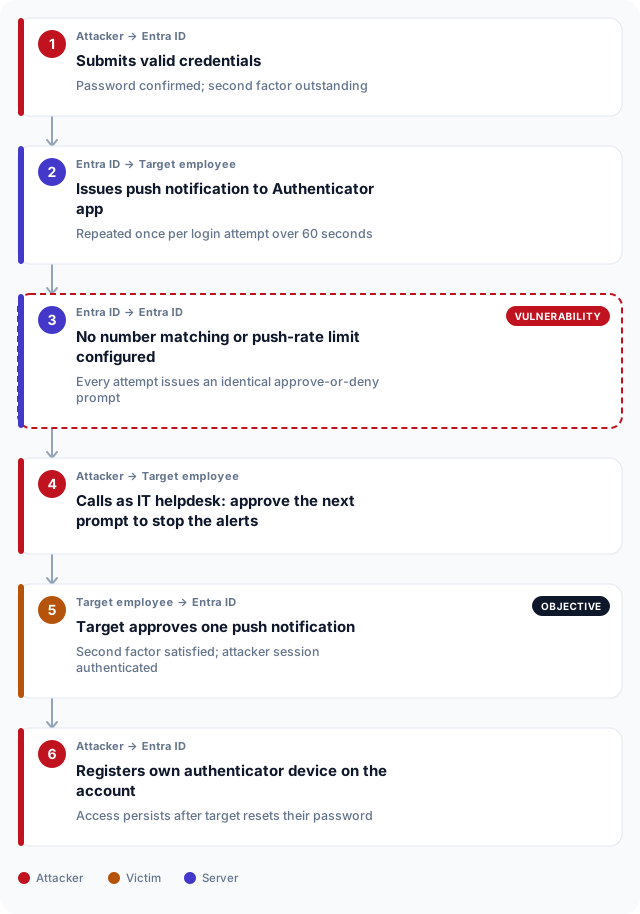
The instruction is specific: approve the next notification to confirm it is you and stop the alerts. The target is not being asked to give up a password or type a code. They are being asked to do what the prompt is already asking them to do, with an authoritative voice on the line confirming it is correct. The sequence diagram below marks the exact point where the second factor is satisfied.
Once the session is captured, the first action is to register a new authenticator device on the target account. In Microsoft Entra ID, a user can add a new Authenticator registration without administrator approval unless a Conditional Access policy or a registration campaign restriction is in place. With their own device enrolled, the attacker survives a password reset. An assumed-breach exercise starting from a session captured this way tests how far that authenticated context reaches before access controls stop it.
What the SOC should see
MFA fatigue generates a recognisable pattern in Microsoft Entra ID SigninLogs: multiple authentication events for one account over a short window, all failing with error code 50076 (MFA challenge issued), followed by a single successful sign-in event. The push notifications do not appear in the log directly, but each login attempt that triggers one does. The KQL rule below fires when five or more MFA challenges are issued for a single account within one minute, which catches the flood while staying above the noise of a user genuinely retrying a failed prompt.
A second signal to correlate is a new device registration in AuditLogs immediately after the successful sign-in. Query AuditLogs | where OperationName == "Register security info" within the same session window and match on UserPrincipalName. The chain of push flood, authentication success and device registration in close sequence is the evidence record a social engineering test report needs to show that the full session-capture chain completed.
// Validate in a non-production Microsoft Sentinel workspace before deploying to production.
// Fires when five or more MFA challenges are issued for one account within a single minute.
SigninLogs
| where TimeGenerated > ago(1h)
| where AuthenticationRequirement == "multiFactorAuthentication"
| where ResultType == "50076"              // AADSTS50076: MFA challenge sent, push issued
| summarize
    PushCount   = count(),
    FirstSeen   = min(TimeGenerated),
    LastSeen    = max(TimeGenerated),
    IPAddresses = make_set(IPAddress)
  by UserPrincipalName, bin(TimeGenerated, 1m)
| where PushCount >= 5
| extend AlertTitle = "Possible MFA fatigue: rapid push flood"
| extend Guidance   = "Correlate with a helpdesk call record or a new device registration in AuditLogs within the same window."
| project AlertTitle, UserPrincipalName, PushCount, FirstSeen, LastSeen, IPAddresses, Guidance
| order by PushCount desc
Breaking the chain: specific controls
Number matching is the single most effective countermeasure. With number matching enabled, the push notification shows a two-digit code that the user must type into their phone before approving. The pretext call cannot work: the caller cannot supply the correct code without access to the target's sign-in screen, and the target cannot approve without it. This one change eliminates the attack as described without requiring any additional user training.
The table below maps each step in the chain to the control that stops it, with the configuration path for Microsoft Entra ID and Okta. Neither number matching nor push-rate throttling is enabled by default on all tenants. Enabling both is a low-cost change relative to the blast radius of a successful MFA fatigue session capture. If you are deciding whether to include this technique in a scope, How to buy a social engineering test covers what the proposal should specify about pretext channels and evidence collection.
| Control | Platform | Configuration path | Effect |
|---|---|---|---|
| Number matching | Microsoft Entra ID | Entra admin center > Protection > Multifactor authentication > Microsoft Authenticator > Configure > Number matching | Requires the user to type a 2-digit code shown on the sign-in screen, blocking blind approval |
| Push-rate throttle with context | Microsoft Entra ID | Entra admin center > Protection > Multifactor authentication > Microsoft Authenticator > Configure > Additional context | Displays app name and geographic location with each push; combined with number matching stops the fatigue pattern |
| Sign-in frequency policy | Microsoft Entra ID | Entra admin center > Protection > Conditional Access > New policy > Session > Sign-in frequency | Caps session lifetime, reducing the value of a captured session |
| Number challenge | Okta | Okta admin console > Security > Authenticators > Okta Verify > Edit > Prompt for number challenge | Requires the user to enter a displayed code rather than tapping Approve |
| Push notification limit | Okta | Okta admin console > Security > Authenticators > Okta Verify > Edit > Maximum push notification wait time | Caps the number of successive push prompts per sign-in attempt |
MFA fatigue and social engineering testing requirements in the UAE
The CBUAE Cyber Security Standards apply to licensed banks and financial institutions across the UAE, including in Abu Dhabi and Dubai. The standards require multi-factor authentication for access to critical systems and privileged accounts, and they mandate periodic testing of authentication controls under realistic adversarial conditions. A push-based MFA implementation without number matching or rate limiting does not satisfy the control intent: the method described in this article bypasses it without any technical compromise of the platform.
DESC requirements apply to Dubai government entities and their technology suppliers. The DESC Information Security Regulation expects authentication controls to be tested under conditions that reflect actual threat actor behaviour, which includes social engineering with a vishing component. For organisations subject to the UAE Information Assurance Regulation, the federal framework similarly requires that access control testing cover human-factor weaknesses and not only technical vulnerability scanning. Abu Dhabi healthcare entities bound by ADHICS face an equivalent obligation. For a full analysis of what each of these frameworks asks for in a social engineering context, see The UAE rules that apply to social engineering testing.
Frequently asked questions
What is MFA fatigue?
MFA fatigue is an attack technique in which an adversary who already holds a valid username and password triggers repeated multi-factor authentication push notifications by submitting the credential in a loop. The target's authenticator app receives notification after notification, each asking for approval. The attacker's goal is to generate enough prompts that the target approves one out of frustration or error, completing the pending authentication. MITRE ATT&CK T1621 documents the technique.
How does MFA fatigue differ from a credential phishing attack?
A credential phishing attack tries to capture the username and password directly, often through a fake login page. MFA fatigue assumes the attacker already has the credential and targets the second factor instead. It does not ask the target to visit a URL or enter a password; it asks them to approve a notification that the legitimate platform sent on the attacker's behalf. The two techniques serve different positions in the attack chain: phishing delivers the first factor, MFA fatigue converts it into a session.
What is number matching in Microsoft Authenticator?
Number matching is a feature in Microsoft Authenticator that displays a two-digit code on the sign-in screen and requires the user to type the same code into the Authenticator app before the approval button activates. Because the code changes with every sign-in attempt, an attacker who cannot see the target's screen cannot supply the correct value. The feature is configured in the Microsoft Entra admin center under Protection > Multifactor authentication > Microsoft Authenticator > Configure > Number matching.
Can MFA fatigue work against hardware tokens or FIDO2 passkeys?
No. Hardware tokens and FIDO2 passkeys do not issue push notifications. FIDO2 authenticators require the user to press a physical device or enter a PIN locally; there is no approve-or-deny prompt to flood. The technique applies specifically to push-based authenticators such as Microsoft Authenticator, Okta Verify and Duo. Migrating high-privilege accounts to FIDO2 passkeys removes the attack surface entirely.
How quickly does the vishing call need to follow the push flood?
The call should arrive while the prompts are still visible on the target's screen. In practice, 30 to 60 seconds after the first push is the effective window. Beyond 60 to 90 seconds, the target may have already dismissed the prompts, changed their password or called the real helpdesk. The 3-second delay between script attempts is chosen to generate urgency without triggering the platform's per-account throttling before the call is ready.
What log field shows MFA challenge issuance in Microsoft Entra ID?
The SigninLogs table in Microsoft Sentinel records every authentication attempt. When a login triggers an MFA challenge, the ResultType field is set to 50076 (AADSTS50076) and the AuthenticationRequirement field is set to multiFactorAuthentication. A burst of 50076 events for one UserPrincipalName within a short window is the primary indicator of a push flood. The subsequent successful authentication, if it occurs, appears in the same table with ResultType 0.
What MITRE ATT&CK technique ID covers MFA fatigue?
MITRE ATT&CK T1621 (Multi-Factor Authentication Request Generation) documents MFA push flooding as a named technique under Credential Access. The vishing component of the combined attack maps to T1656 (Impersonation) under Defense Evasion. Together, the two techniques describe the full chain: T1621 delivers the prompt volume and T1656 delivers the authority that converts one prompt into an approval.
How does an attacker maintain access after a successful MFA fatigue attack?
Immediately after gaining an authenticated session, the attacker registers their own authenticator device on the target account. In Microsoft Entra ID, a user can add a new Authenticator registration without administrator approval unless a Conditional Access policy restricts it. Once the attacker's device is enrolled, a password reset by the target or the IT team removes the credential but leaves the second factor intact, so the attacker can re-authenticate with their own device and the target's new password.
Does rate limiting alone stop MFA fatigue?
Rate limiting reduces the number of pushes an attacker can deliver but does not stop the technique on its own. A limit of 3 to 5 pushes per session may still produce enough prompts for a target to approve one, particularly if the vishing call arrives simultaneously. Number matching is the more reliable control because it changes what the approval action requires rather than limiting how many times it can be requested. Combining rate limiting with number matching and an anomaly detection rule addresses both the flood and the blind approval.