Key takeaways
- The device authorization flow lets an attacker start a real sign-in on the genuine IdP and hand the completion step to the victim. No fake login page is needed.
- The attacker receives an access token and a refresh token. The refresh token survives a password reset until it is explicitly revoked.
- Multi-factor authentication does not block this attack. The victim completes real MFA as part of approving the code.
- Conditional access policies that restrict which devices or locations can complete a device flow are the primary technical control.
- Device code phishing maps to MITRE ATT&CK T1566.002 and T1528, and its primary weakness is CWE-522.
What the device authorization grant was built for
The OAuth 2.0 device authorization grant was built for constrained devices, such as smart TVs and CLI tools running without a display, that cannot open a browser to authenticate. The device starts a session, the identity provider issues a short user code and a verification URI, and the user completes authentication on a separate device. Once the user approves, the device polls the token endpoint and collects its tokens.
The design fits its intended purpose. The problem is that the flow makes no assumption about who initiated the device code request. Any caller with a valid client_id can start it. The identity provider has no way to verify that the person approving the code is the one who started the session.
How an attacker starts the flow: the device code request
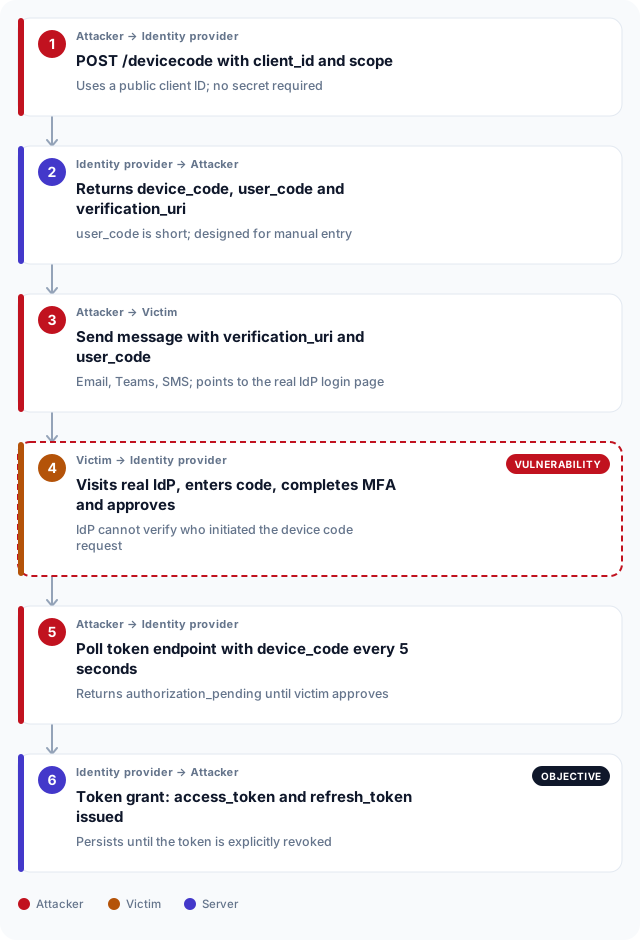
An attacker starts by posting to the IdP's device authorization endpoint. For Microsoft Entra ID, that is https://login.microsoftonline.com/common/oauth2/v2.0/devicecode. The attacker supplies a public client_id, which requires no secret for this grant type, and a scope that matches the access they want. The IdP responds with a device_code, a short user_code, a verification_uri pointing to the genuine login page, and an expiry window of typically 15 minutes.
A broad scope such as offline_access https://graph.microsoft.com/.default requests access to the Microsoft Graph API and a refresh token. Because the client_id belongs to a registered application the IdP already trusts, the request goes through without any authentication from the attacker. The attacker now holds a device_code to poll with and a user_code to pass to the victim.
POST /common/oauth2/v2.0/devicecode HTTP/1.1
Host: login.microsoftonline.com
Content-Type: application/x-www-form-urlencoded

client_id=<public-client-id>&scope=openid+profile+offline_access+https%3A%2F%2Fgraph.microsoft.com%2F.defaultHTTP/1.1 200 OK
Content-Type: application/json
{
"device_code": "BAQABAAEAAAD--opaque--",
"user_code": "FPMZ9N87",
"verification_uri": "https://microsoft.com/devicelogin",
"expires_in": 900,
"interval": 5,
"message": "To sign in, use a web browser to open https://microsoft.com/devicelogin and enter the code FPMZ9N87 to authenticate."
}Delivering the lure: no fake page, no SSL warning to ignore
The lure is a message containing the verification_uri and the user_code. Both are real: the URI points to the genuine IdP login page and the code was issued by that same IdP. A pretext claiming the victim's device needs re-authentication or that a new application requires approval is enough to prompt action. The victim visits https://microsoft.com/devicelogin, a URL with a valid certificate and a familiar appearance, enters the eight-character code and completes their normal sign-in, MFA included.
Device code phishing works precisely against targets who have learned to check URLs and certificates. The domain is correct, the certificate is valid and the MFA prompt is real. There is nothing to flag. The victim is completing a legitimate authentication session on a system they recognise. The only signal that something is wrong is that they did not initiate it. Testing whether staff catch that gap is a central objective in social engineering engagements. The article on the UAE rules that apply to social engineering testing covers the authorization and scoping requirements for that work.
Approval and token collection: what the attacker receives
While the victim works through the lure, the attacker polls the token endpoint every five seconds. Each request returns an authorization_pending error until the victim approves. Once the sign-in is complete, the next poll succeeds and the IdP returns a full token response, including an access token and, if offline_access was in scope, a refresh token.
The access token is a signed JWT that grants access to the requested scopes straight away. The refresh token is the more durable credential: an attacker who holds one can request new access tokens for as long as it remains valid. The window the expires_in parameter gave the victim to enter the code is irrelevant once the tokens are issued. The device_code has been spent, but the refresh token does not expire for weeks or months under default IdP settings.
POST /common/oauth2/v2.0/token HTTP/1.1
Host: login.microsoftonline.com
Content-Type: application/x-www-form-urlencoded

grant_type=urn%3Aietf%3Aparams%3Aoauth%3Agrant-type%3Adevice_code&device_code=BAQABAAEAAAD--opaque--&client_id=<public-client-id>HTTP/1.1 200 OK
Content-Type: application/json
{
"token_type": "Bearer",
"scope": "openid profile offline_access https://graph.microsoft.com/.default",
"expires_in": 3599,
"access_token": "eyJ0eXAiOiJKV1QiLCJhbGciOiJSUzI1NiJ9...",
"refresh_token": "0.AVoAzDZRvZnpTkSbcQ...",
"id_token": "eyJ0eXAiOiJKV1QiLCJhbGciOiJSUzI1NiJ9..."
}What the attacker holds and how long it lasts
The access token is short-lived, typically one hour, and is enough to read email, list SharePoint files or query directory data straight after capture. The refresh token is what matters for persistence. Microsoft Entra ID issues refresh tokens on a 90-day sliding window: each use resets the clock. An attacker who checks email once a day keeps access indefinitely. A password reset does not revoke it, because the refresh token is bound to the OAuth session, not the user's password.
Revoking access requires an administrator to invalidate the token in the IdP portal or call the revocation endpoint. Without that step, the attacker retains access through password resets, account lockouts and device wipes, all of which sit on different layers of the authentication stack. A red team engagement or assumed breach exercise that uses stolen tokens to demonstrate durable access to cloud resources is one way to find this persistence before a real attacker does.
| Property | Access token | Refresh token |
|---|---|---|
| Typical lifetime | 1 hour | 90 days (sliding window, resets on use) |
| Purpose | Bearer credential on API calls | Exchange for a new access token |
| Survives password reset | No, revoked within minutes | Yes, unless explicitly revoked |
| Revoked by user action | No direct self-service action | Sign out all sessions in IdP portal |
| Evidence of use | API request logs at the resource | Token endpoint logs at the IdP |
| MITRE mapping | T1528: Steal Application Access Token | CWE-522: Insufficiently Protected Credentials |
Where this technique sits in the Unified Kill Chain
Device code phishing sits at the boundary between the In and Out stages of the Unified Kill Chain. The In stage covers reconnaissance, delivery and the social engineering step that leads the victim to approve the code. No software vulnerability is exploited: the victim performs a correct operation on a legitimate system. The Out stage begins the moment the token arrives. The attacker holds authenticated access to cloud resources, and the credential is built to last.
MITRE ATT&CK maps the delivery to T1566.002 (Spearphishing Link) and the credential capture to T1528 (Steal Application Access Token). The underlying weakness is CWE-522: Insufficiently Protected Credentials, because the IdP issues credentials to a party it cannot verify as the intended recipient. Testing whether staff recognize and report a sign-in request they did not initiate is a core objective of social engineering testing. Teams that want to measure detection coverage alongside the test should look at purple teaming, which runs the technique against a live detection stack and produces alert rules the team owns.
In
Reconnaissance
Confirm the target IdP and that device flow is active
Device code request
Attacker calls the real IdP; no secret required
Delivery
Victim receives lure with genuine login URI and user code
Out
Token capture
Attacker polls while victim approves; IdP issues tokens
Persistent access
Refresh token survives password resets until revoked
Device code phishing and identity security in the UAE
Microsoft 365 and Entra ID are widely used across financial institutions, government entities and healthcare organizations in Dubai and Abu Dhabi, making the device authorization flow a live attack surface for UAE-based targets. CBUAE's cybersecurity framework for banks and financial institutions requires controls over authentication and access management, including monitoring for anomalous sign-in patterns. A device code grant completing from an unrecognized location or unmanaged device is exactly the signal that framework expects to be detected and investigated.
In Dubai, DESC-regulated government entities and their technology suppliers must assess and test authentication controls as part of their information security programs. The DESC cybersecurity standard covers access management and identity protection as areas requiring periodic testing. In Abu Dhabi, ADHICS-regulated healthcare organizations must maintain controls over privileged and delegated account access, and cloud identity management falls within that scope as organizations move clinical and administrative workloads to Microsoft 365 and equivalent platforms.
Federally, the UAE Information Assurance Regulation published by TDRA sets requirements for identity and access controls across government systems. None of these frameworks name device code phishing by name, but all require that authentication controls be tested against realistic techniques that reflect the current threat environment. A social engineering engagement that includes device code phishing scenarios produces direct evidence for those requirements. Pairing it with penetration testing of network and conditional access controls gives a fuller picture of the identity attack surface.
Frequently asked questions
What is OAuth device code phishing?
OAuth device code phishing abuses the device authorization flow, which was built for constrained devices like smart TVs that cannot open a browser. An attacker starts a real sign-in session on the genuine identity provider, sends the victim the login URL and a short code to enter, then polls for the resulting tokens. The victim never visits a fake page. The entire interaction takes place on infrastructure the identity provider controls.
How does device code phishing differ from standard credential phishing?
Standard credential phishing sends the victim to a lookalike login page the attacker controls, where their password is captured. Device code phishing sends the victim to the real login page on the genuine identity provider. The URL is correct, the certificate is valid and MFA completes normally. The attacker captures OAuth tokens rather than a password, and those tokens survive any subsequent password change.
Which identity providers are susceptible to device code phishing?
Any identity provider that implements the OAuth 2.0 device authorization grant and allows public clients to start the flow is susceptible. Microsoft Entra ID is the most common target in enterprise environments, but the flow is also available on Google Workspace, Okta and other enterprise IdPs. The attack requires no vulnerability in the identity provider. It uses the flow as designed.
Does multi-factor authentication prevent device code phishing?
No. The victim completes real MFA as part of signing in to approve the code. MFA verifies the victim's identity to the identity provider, but it does not verify that the device requesting the session belongs to them. The token is issued to the attacker's polling client after the victim passes MFA, because the approval and the session initiation are deliberately separate in the device code flow.
How long does an attacker retain access after a successful device code phishing attack?
Access persists until the refresh token is explicitly revoked. Microsoft Entra ID issues refresh tokens on a 90-day sliding window by default, reset each time the token is used. An attacker who uses the credential regularly retains access through password resets, account lockouts and device wipes. All of those controls operate on different parts of the authentication stack.
Does resetting the compromised account's password revoke the attacker's tokens?
A password reset revokes the access token within minutes in most configurations. For the refresh token, a reset alone is not enough in Microsoft Entra ID: the administrator must also use the Revoke Sign-in Sessions control or call the token revocation endpoint. Incident response must include an explicit token revocation step, not just a password change.
What can an attacker access after a device code phishing attack succeeds?
Access is determined by the scopes the attacker requested in the initial device code request and what the application is permitted to reach. Requesting `https://graph.microsoft.com/.default` grants access to email, calendar, files, directory data and other Graph API resources within the victim's delegated permissions. The attacker operates with the victim's full rights for those scopes.
How can a security team detect device code phishing attempts?
The main signals are sign-in events showing a device code grant from an unexpected location or unmanaged device, and token endpoint logs showing a device code grant for a user who did not initiate it from a known device. User reports of unexpected MFA prompts are a reliable early indicator. Conditional access policies can alert on or block device code flow completions from unmanaged devices or untrusted network locations.
Is device code phishing used in authorized social engineering and red team tests?
Yes. It is a standard technique in social engineering and red team scenarios because it tests whether staff recognize a sign-in request they did not initiate, whether helpdesk processes reach the security team, and whether identity monitoring catches the anomalous token grant. The engagement must be authorized in writing and scoped to name the target tenant and identity provider before any device code requests are made.
What technical controls reduce the risk of device code phishing?
Conditional access policies that restrict the device authorization flow to managed devices and trusted networks are the most direct control. Some identity providers allow the device code grant to be disabled entirely for users with no legitimate need for it. User awareness training that teaches staff to confirm they initiated a sign-in request before completing it covers the cases conditional access cannot reach.