Key takeaways
- A mobile login only protects the account if the session token is stored in the platform keystore, not in a key-value file or a local database.
- Shared preferences on Android and the NSUserDefaults plist on iOS are plain text inside the app sandbox, readable through a device backup or a rooted shell.
- A token read off the device can be replayed against the API from any machine. The attacker reaches the account with no password and no prompt.
- The fix is to keep secrets in the Keychain or Keystore, issue short-lived revocable tokens, disable cleartext backups and keep secrets out of logs.
The account is on the phone, not just behind the login
A login screen suggests a password protects the account. On a mobile app that is half the story. Once a user signs in, the app holds a session token so it does not ask for the password on every screen. It also caches data so the app still works with no signal. Where it keeps those two things decides whether the login means anything. If the token lands somewhere another app or another person can read it, the password stops protecting the account.
Both platforms give an app a private sandbox and a hardware-backed secret store: the Keychain on iOS and the Keystore on Android. A secret placed there is bound to the device and to the app, and it does not come out in a backup. The failure this article describes needs no exploit. The app never uses that store. It writes the token to a key-value file or a local database in plain text instead. That is one part of what a mobile app pentest looks at, alongside the network and the backend the client talks to.
Developers reach for the plain stores because they are easy. A key-value file takes one line to write and one to read. The keystore has an API to learn and key material to manage. The convenience is real, and so is the cost, because the easy store is also the one anyone with the file can read.
Keychain / Keystore
Hardware-backed store bound to the app and the device
Shared preferences
Key-value file in the sandbox, stored in plain text
Local database
SQLite for offline data, unencrypted by default
Logs and caches
Crash logs and cache outlive the session
Where the data lives on the device
Two stores cause most of the trouble, because they are the easiest to use and the least protected. On Android, SharedPreferences is a key-value store written as an XML file under the app's shared_prefs directory. On iOS, NSUserDefaults does the same job and lands in a property list inside the app's data container. Both are meant for settings such as a theme choice or the last screen the user opened. Neither is encrypted. Once you have the file, you can read it.
The other common home is a local database. Apps cache profile data, messages and sometimes card details in SQLite, which neither platform encrypts by default. Logs and crash reports are the third place, and the one people forget. A token printed once during debugging stays in the log buffer and in every crash upload. CWE classifies a secret in any of these as cleartext storage of sensitive information, CWE-312. The table below shows what belongs where, and what should never appear outside the secret store. For the wider method, see how a mobile app pentest is run.
| Location | Android | iOS | What should never be here |
|---|---|---|---|
| Key-value store | SharedPreferences XML | NSUserDefaults plist | Session tokens, passwords |
| Structured data | SQLite in databases/ | Core Data or SQLite | Card numbers, full personal records |
| Secret store | Keystore, EncryptedSharedPreferences | Keychain | This is the correct place |
| Logs and cache | Logcat, app cache | Console, app cache | Anything sensitive at all |
Getting the data off the device
You do not need a zero-day to read an app's files. The cheapest path is a device backup. If an Android app leaves android:allowBackup at its default of true, adb backup exports the private data directory to a file on your workstation with no root. The archive is a short header followed by a compressed tar, so it unpacks with common tools. The OWASP Mobile Application Security project sets out how a tester checks each store in turn.
On a rooted Android device or a jailbroken iPhone you can read the sandbox directly. On iOS, an unencrypted Finder or iTunes backup exposes the same files to anyone with the computer it synced to. However you reach them, the interesting file is usually small. Below is the shared preferences entry a wallet app wrote when the user ticked remember me.
The value is a JSON Web Token. Nothing about it is protected. Base64 is encoding, not encryption, and the token grants whatever the server granted at login. Watching the traffic to confirm how the app sends the token is a separate technique, covered in breaking a mobile app's certificate pinning. For this attack you do not need the network at all. The file is enough.
# allowBackup=true lets adb export the app's private data
adb backup -f app.ab -noapk com.example.wallet

# the .ab file is a 24-byte header, then a zlib-deflated tar
dd if=app.ab bs=1 skip=24 | zlib-flate -uncompress | tar -xvf -
cat apps/com.example.wallet/sp/session.xml<?xml version='1.0' encoding='utf-8' standalone='yes' ?>
<map>
<string name="access_token">eyJhbGciOiJIUzI1NiIsInR5cCI6IkpXVCJ9.eyJzdWIiOiI0ODIxMyJ9...</string>
<boolean name="remember_me" value="true" />
</map>Replaying the token, from any machine
A stolen session token works like a password that nobody had to type. Copy it to another machine, send it in the Authorization header the app would send, and the API answers. It cannot tell that the request came from a different device, because the token is the whole proof of identity. This step turns a readable file into account access.
The API returned the account holder's email, balance and verification status with no password and no second factor. In ATT&CK terms this is data from the local system, T1533, feeding credential access. It sits in the Out stage of the Unified Kill Chain, where the attacker reaches the objective by collecting what the device already held. A token like this often outlives a logout. The server session and the on-device copy are cleared independently, and the weakness is in the client's storage, not the server. Testing the backend that trusts these tokens is its own engagement, an API pentest.
curl -s https://api.example.com/v1/account \
-H 'Authorization: Bearer eyJhbGciOiJIUzI1NiIsInR5cCI6IkpXVCJ9...'HTTP/2 200
content-type: application/json
{"id":"48213","email":"[email protected]","balance":"12840.00","kyc":"verified"}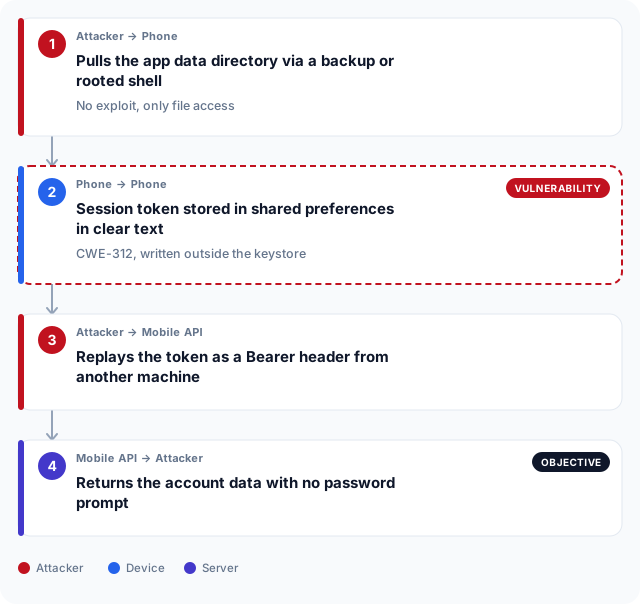
What breaks the chain
The chain depends on one thing: a secret readable outside the secret store. Close that and the rest fails. Put tokens and keys in the Keychain on iOS and the Keystore on Android. Use EncryptedSharedPreferences where a key-value shape is convenient, so the material is bound to the device and stays out of backups. Never write a secret to a log or leave it in a WebView cache. CWE calls this class of weakness insufficiently protected credentials, CWE-522.
Storage is not the only lever. Short-lived tokens the server can revoke shrink the value of a copied one, because an expired or killed token buys the attacker nothing. Set android:allowBackup to false and exclude sensitive files from device backups. The grid below ranks these fixes by what they cost and what they buy. A pentest report orders them the same way, cheap high-value changes first, and that ordering is part of any penetration test.
Risk reduced
Use the keystore
Keychain on iOS, EncryptedSharedPreferences on Android, bound to the device.
Short-lived tokens
Server-revocable sessions that expire, so a copied token soon buys nothing.
Block cleartext backups
Set allowBackup to false and exclude sensitive files from device backups.
Strip secrets from logs
Keep tokens out of logcat, crash uploads and the WebView cache.
Effort
What this means for apps shipped from Abu Dhabi and Dubai
A mobile app that stores a session token in clear text fails the same control whether it ships from Abu Dhabi or Dubai. What differs is the regulator that reads the finding. A bank or payments app answers to the Central Bank of the UAE, whose information security expectations require stored authentication data to be protected at rest. A Dubai government entity, or a supplier building an app for one, is measured against the Dubai Electronic Security Centre standard, which sets out how applications must handle credentials and personal data.
At the federal level, the UAE Information Assurance Regulation published through NESA asks the same of sensitive data held on a device. A healthcare app used in Abu Dhabi also falls under ADHICS, where patient data on a phone is in scope. None of these regimes care whether the login screen looks secure. They ask where the token and the personal data rest. A plain-text copy in shared preferences is the answer that fails an assessment in either emirate.
Frequently asked questions
What is insecure data storage in a mobile app?
An app stores data insecurely when it writes something sensitive, such as a session token, password or personal record, to a location on the device that is not the platform secret store. On Android that is often a SharedPreferences file or a SQLite database, and on iOS it is NSUserDefaults or an app database. Because these are not encrypted, anyone who can read the app's files can read the data. It is tracked as CWE-312, cleartext storage of sensitive information.
How does an attacker read data a mobile app stored on the phone?
The most common path needs no exploit. If the app allows backups, adb backup on Android exports the private data directory to a workstation. On a rooted or jailbroken device the sandbox is directly readable, and an unencrypted iOS backup exposes the same files. From there the attacker opens the shared preferences file or the database and reads the value.
How does EncryptedSharedPreferences differ from SharedPreferences?
SharedPreferences stores key-value data as a plain XML file that anyone with the file can read. EncryptedSharedPreferences keeps the same interface but encrypts keys and values with a key held in the Android Keystore, so the file is unreadable without the device. The difference is where the encryption key lives: in the hardware-backed keystore rather than in the file itself. For secrets, use the encrypted variant or the Keystore directly.
Can this be exploited without rooting or jailbreaking the device?
Yes. If the app leaves android:allowBackup at its default, adb backup pulls the data directory on a stock device with no root. On iOS an unencrypted Finder or iTunes backup exposes the app's files to anyone with access to the synced computer. Rooting and jailbreaking make it easier, but they are not required when a backup path is open.
Does a device PIN or screen lock protect the app's stored data?
Not against this. A screen lock stops someone picking up the phone and using the interface, but it does not encrypt the app's files in a way that blocks a backup or a rooted read. Full-device encryption protects data when the device is off, yet once it is unlocked and running the app's plain-text files are readable. The token has to be protected by the keystore, not by the lock screen alone.
What data should never be stored on the device?
Long-lived secrets and raw personal data. Session tokens, refresh tokens, passwords and API keys belong in the Keychain or Keystore, never in a preferences file, a database row or a log. Full card numbers and complete personal records should not sit unencrypted in a local database. If it would matter in the wrong hands, it does not belong outside the secret store.
Are iOS apps safer than Android for local storage?
Neither platform is safe by default. Both give an app a sandbox and a hardware secret store, and both let an app ignore it. iOS raises the bar slightly because default backups can be encrypted and the sandbox is harder to reach without a jailbreak. The failure is the same on each: a developer writes a token to NSUserDefaults or SharedPreferences instead of the Keychain or Keystore. The storage choice decides the outcome, not the platform.
Does certificate pinning stop a token being read off the device?
No. Certificate pinning makes it harder to watch the app's network traffic, but it does nothing about a token already written to disk. If the token sits in clear text on the device, an attacker reads it from the file and replays it directly against the API, never touching the pinned connection. Pinning and storage are separate controls that fail independently.
How is insecure storage found during a mobile app pentest?
A tester installs the app, signs in, then inspects the sandbox: the shared preferences files, the local databases, the logs and any cache. They check whether tokens, keys or personal data appear in clear text, and whether a backup exports them. The finding is confirmed by replaying a recovered token against the API. OWASP's Mobile Application Security project provides the full checklist.