
Key takeaways
- Certificate pinning is a client-side control. On a device the tester controls it can be turned off, so it is defence in depth and never a substitute for server-side checks.
- The pin is rarely the finding. It hides the finding: the readable API traffic exposes endpoints, tokens and object ids that the app's own screens never show.
- A runtime hook with Frida or objection disables most pin implementations in seconds, and repackaging and re-signing the app does the same without root.
- The flaw that matters is usually broken object level authorization: the backend authenticates the token but never checks that the object belongs to the caller.
- Fix the backend, not the pin. Enforce ownership on every request and test the API as its own attack surface.
Why the proxy goes blank
Point a proxy at a mobile app and, often, nothing happens. The connection dies at the TLS handshake and the proxy log stays empty. That is certificate pinning doing its job. The app ships with a copy of the certificate or public key it expects from its server, and it refuses any TLS session that presents a different one. Your interception proxy presents its own certificate, signed by a CA you generated, so the app rejects it and closes the connection before a single API call leaves the device.
Two separate obstacles are easy to confuse. Since Android 7, an app does not trust user-installed CA certificates unless its network security configuration opts in, so even an unpinned app may ignore your proxy CA until you deal with that. Pinning is the stronger control layered on top: even a fully trusted CA is rejected, because the presented certificate is not the pinned one. The device log tells you which wall you have hit. Getting past the transport check is one of the first things a mobile app pentest has to do, and the method is written down in the OWASP Mobile Application Security Testing Guide.
$ adb logcat | grep -iE "ssl|pin|trust"
E/CertPinManager: Pin verification failed for api.example.com
E/CertPinManager:   Presented: sha256/AAAA...proxy-ca...AAAA=
E/CertPinManager:   Pinned:    sha256/BBBB...real-leaf...BBBB=
D/TLS: javax.net.ssl.SSLPeerUnverifiedException: Certificate pinning failure!
Bypassing the pin on a device you control
Every bypass starts from the same fact: the check runs on the device, and on a rooted phone, a jailbroken one or an emulator, the tester owns the device. There are two families. Runtime instrumentation attaches to the running process and forces the pinning check to return success without touching the binary on disk. Static repackaging decompiles the app, patches the check or rewrites the network configuration, then re-signs and reinstalls it, which needs no root but does need a resign the app's own integrity checks may notice.
In practice, objection wraps the common cases: it searches the running app for the usual pinning classes, an OkHttp CertificatePinner, a TrustManager, a TrustKit configuration, and overrides each one. A short Frida script does the same when the pin is custom or implemented in native code. Injecting your proxy CA into the system trust store, a separate step, defeats only the Android 7 user-CA restriction and does nothing to pinning, so the two are worth keeping straight. The class of weakness these bypasses exploit is tracked as improper certificate validation, CWE-295.
# Runtime hook: load an unpinning script into a fresh launch
$ frida -U -f com.example.app -l unpin.js --no-pause

# Or let objection find and patch the common cases for you
$ objection -g com.example.app explore
com.example.app on (Android: 13) [usb] # android sslpinning disable
(agent) Found okhttp3.CertificatePinner, overriding check()
(agent) Found TrustManagerImpl, overriding checkTrustedRecursive()
(agent) Registering job SVQ8G. Type: android-sslpinning-disable| Method | Needs | Defeats | Fails when |
|---|---|---|---|
| Frida unpinning script | Root or emulator, frida-server | Most pin implementations, including native | The app carries anti-Frida or anti-root checks |
| objection sslpinning disable | Frida underneath it | Common OkHttp, TrustManager and TrustKit pins | A custom or heavily obfuscated pin |
| Repackage and patch | apktool, a resign key | The pin and the user-CA restriction | An integrity or Play Integrity check refuses the resigned build |
| System CA injection | Root | The Android 7 user-CA restriction only | Always, against pinning: it does nothing to a pin |
Reading the traffic the app was hiding
With the pin disabled and the proxy CA trusted, the app's real traffic appears. Route it through the proxy, by setting the device Wi-Fi proxy or by redirecting with iptables, and every request the app makes is now legible: the endpoints it calls, the headers it sets, the bearer token it carries and the bodies it sends. The screens gave you a filtered view; the wire gives you the whole conversation.
This is the point of the exercise. The backend behind a mobile app is a first-class attack surface, and it is frequently less hardened than the web application front end, on the assumption that only the app ever calls it. Once the traffic is readable it can be replayed, edited and fuzzed like any other, which is exactly what an API pentest does to it. The pin was the only thing standing between an attacker and that surface.
GET /api/v2/accounts/48213/statements HTTP/2
Host: api.example.com
Authorization: Bearer eyJhbGciOiJSUzI1NiIsInR5cCI6IkpXVCJ9...
User-Agent: ExampleBank/4.7.1 (Android 13; build 4710)
Accept: application/json
In
Prepare device
Rooted, jailbroken or a repackaged build
Trust the proxy CA
System store, or a patched network config
Through
Disable the pin
Runtime hook or a patched binary
Route the traffic
Device proxy or an iptables redirect
Read the API
Endpoints, tokens and bodies now clear
Out
Confirm the flaw
A server-side check the app was hiding
Evidence impact
Another user's record retrieved
The flaw the pin was covering
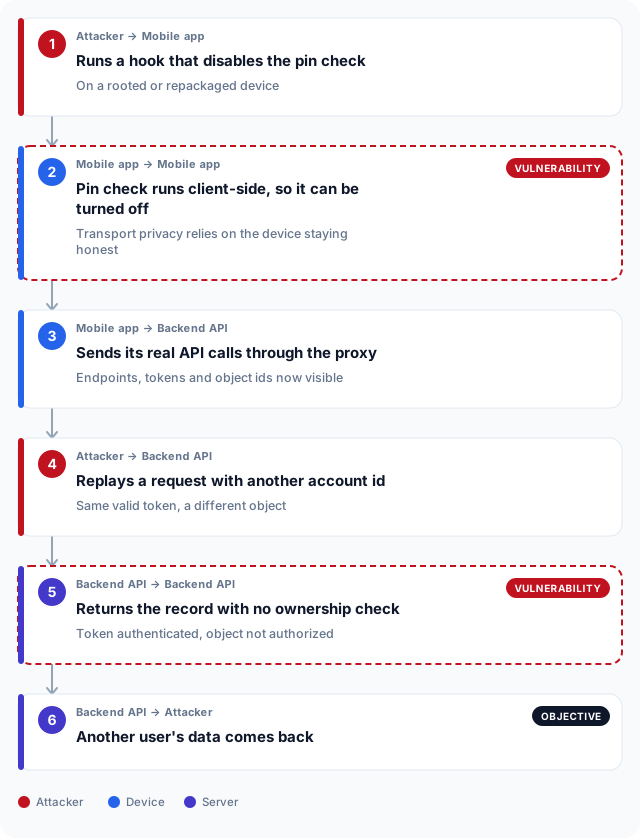
The pin is almost never the finding. It is the lid. Underneath it, the common one is broken object level authorization, the flaw OWASP lists first in its API risks and that older writing calls an insecure direct object reference. The app only ever asks for your own account, so the flaw is invisible through the interface. When the traffic is readable, the object id in the request is right there, and the obvious test is to change it.
Take the captured request and swap the account id for a neighbour's. The token is still yours and still valid. If the backend authenticates the token but never checks that account 48214 belongs to the caller, it returns another customer's statements with a 200. That is the whole chain: the pin was bypassed to see the request, and the request exposed a server-side authorization gap that has nothing to do with transport at all. A token seen on the wire is often the same token cached in the app's own storage, which is a second way into the same account. Reading someone else's traffic in this position is a form of adversary-in-the-middle, ATT&CK T1557, turned inward on an app the tester is authorized to examine.
GET /api/v2/accounts/48214/statements HTTP/2
Host: api.example.com
Authorization: Bearer eyJhbGciOiJSUzI1NiIsInR5cCI6IkpXVCJ9...
Accept: application/jsonHTTP/2 200 OK
Content-Type: application/json
{
"accountId": 48214,
"holder": "another customer",
"statements": [
{ "id": 91002, "amount": -1450.00, "currency": "AED" }
]
}
What breaks the chain
Keep pinning. It raises the cost of casual interception and it is worth having. Just be clear about what it does and does not do. It slows an attacker who does not yet control the device, and it does nothing against one who does. It is a transport control, and the chain above never turned on transport: it turned on a backend that trusted a valid token to also mean an authorized object. Anti-tamper and root detection raise the cost further and are themselves bypassable, so layer them rather than depend on any one.
The fix that closes the chain sits on the server. Enforce object level authorization on every request, so the identity in the token has to own the object being asked for, and never infer permission from the fact that the app only ever sends well-behaved ids. Do not ship secrets in the client, because a bypassed pin makes the client readable. Test the API directly, on the assumption that its transport protection is already gone. That pairing, the client and the backend examined together, is what a mobile app pentest is for, and it is why sending sensitive data without real protection is tracked separately as cleartext transmission, CWE-319.
Mobile backends under UAE regulators
A great deal of UAE life runs through a mobile app: banking, government services in both Dubai and Abu Dhabi, healthcare portals and delivery. The regulators that name security testing do not stop at the login screen. A bank publishing an app in Dubai or Abu Dhabi answers to the Central Bank of the UAE, whose expectations reach the backend the app talks to, not just the client on the phone. A Dubai government entity and its suppliers work under the Dubai Electronic Security Centre, and a healthcare provider in Abu Dhabi under ADHICS, both of which care about who can reach a record and under what authorization.
The lesson of this chain is the one those regimes keep asking for. A pinned certificate looks like protection in a checklist, but it is a client-side control, and the object level authorization behind it is what actually keeps one customer out of another's account. A free-zone entity and a mainland one both have to satisfy their sector regulator on that point. When you scope a mobile app pentest here, scope the backend with it, because that is where the finding that matters usually lives.
Frequently asked questions
What is certificate pinning in a mobile app?
Certificate pinning is a control where an app stores the exact certificate or public key it expects from its server and refuses any TLS connection that presents a different one. It stops an interception proxy reading the traffic, because the proxy's certificate is not the pinned one. It is a client-side check, so it runs on the device and can be disabled by anyone who controls that device.
How is certificate pinning different from just using HTTPS?
Plain HTTPS trusts any certificate signed by a CA the device trusts, which includes a CA a tester or attacker has installed. Pinning is stricter: it trusts one specific certificate or key and rejects every other, even a validly signed one. So HTTPS alone lets a trusted proxy read the traffic, while pinning is meant to block that until the pin itself is bypassed.
Does bypassing certificate pinning need a rooted or jailbroken device?
Runtime methods with Frida or objection generally need root on Android, a jailbreak on iOS, or an emulator you fully control. Repackaging is the exception: you can decompile the app, patch the pinning check or the network configuration, re-sign it and install the result without root. The trade-off is that the resigned build can trip an integrity check the original did not.
Is bypassing certificate pinning legal?
Only with authorization, on an app and a device you are permitted to test. In a penetration test it is standard, scoped work agreed in writing before it starts. Doing it to an app or account that is not yours, or without the owner's consent, is not testing and may be an offence, so the engagement letter and the scope are what make it lawful.
How does disabling pinning with Frida differ from repackaging the app?
Frida hooks the running process in memory and forces the pin check to pass without changing the file on disk, which is fast but needs root or an emulator. Repackaging rewrites the app itself, patching the check or the network configuration, then re-signs and reinstalls it, which works without root but requires a resign and can be detected by integrity checks. Frida is quicker to try, repackaging is more durable when root is not available.
If pinning can be bypassed, is it worth implementing?
Yes, as defence in depth. Pinning raises the cost of casual interception and blocks an attacker who does not control the device. What it must not do is stand in for server-side authorization, because an attacker who owns the device removes the pin and the backend is then exposed on its own merits.
What backend flaws does reading the API traffic usually reveal?
The most common is broken object level authorization, where the server checks that the token is valid but not that the requested object belongs to the caller. Reading the traffic also exposes tokens, hidden or undocumented endpoints, weak rate limiting and parameters the app never lets a user edit through its screens. These are ordinary API flaws that the app's interface simply hid from view.
Can pinning be bypassed without root using network_security_config?
Rewriting the network security configuration to trust user CAs only defeats the Android 7 restriction on user-added certificates, which is a separate obstacle from pinning. To remove a real pin without root you generally repackage the app and patch or strip the pinning logic, then re-sign it. Editing the configuration alone does not disable a pin that is coded into the app.
What does OWASP say about testing certificate pinning?
The OWASP Mobile Application Security Testing Guide documents how to identify pinning, how to bypass it during a test, and how to verify that a bypass does not open a wider hole. It treats the bypass as a means to inspect traffic, not an end, and points the tester at the server-side controls the pin was protecting. It is the primary reference for this class of work.